Understanding the Importance of Form CAPSBACS4 in Payment Processing
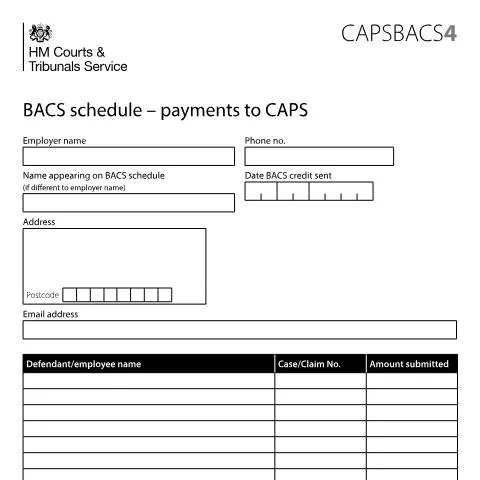
When it comes to making payments through the HM Courts & Tribunals Service, the significance of the CAPSBACS4 form cannot be overstated. This document acts as a crucial schedule used for processing payments via BACS (Bankers' Automated Clearing Services) to the Court Appointed Payment System (CAPS). It plays a key role in ensuring that payments are accurately recorded and processed. For those unfamiliar with the procedure, the absence of this document can lead to delayed processing and potential complications in your case. As a stakeholder in the legal process, whether you are a defendant, employee, or part of an employer’s payroll team, knowing the intricacies of this form can save you time and hassle. This article takes you through all the essential aspects of the CAPSBACS4 form, providing practical information on how to navigate the entire process effectively.Step-by-Step Guide to Completing the CAPSBACS4 Form
Holding the right information is vital when filling out the CAPSBACS4 form. The accuracy of the details you provide directly impacts the reliability of payment processing. Let’s break down the components you need to include:Essential Information Required
- Defendant/Employee Name: Clearly state the name of the individual for whom the payment is being made.
- Case/Claim Number: Input the corresponding case or claim number; this ensures that the payment is matched to the right legal matter.
- Amount Submitted: Specify the total amount you are paying.
- Grand Total: At the bottom of the schedule, include the grand total of all payments being made that day.
Employer Information
Include specific details about the employer, such as:
- Employer Name: The name of the organization making the payment.
- Name on BACS Schedule: If different from the employer's name, specify how it appears on the BACS schedule.
- Contact Details: This includes the employer's address, postcode, email address, and phone number.
Delivery Channels: Email versus Paper Submission
Once you have completed the CAPSBACS4 form, you will need to determine how to submit it. There are primarily two avenues available: electronic submission via email or traditional paper submission. However, the preferred method is to email it directly to the specified address.Email Submission
The process of emailing your CAPSBACS4 schedule has several benefits:
- Speed: An email reaches the intended recipient almost instantly.
- Accessibility: You can keep a digital copy for your records, ensuring easy reference in future communications.
To submit via email, you will need to send the completed CAPSBACS4 form to [email protected]. Make sure to include your company name in the subject line, as this needs to match the remitter's name listed in field ten of the payment details form (CAPSBACS2).
Paper Submission
While electronic submissions are encouraged, some may prefer or need to submit a paper version. If you choose this route, ensure that you send the document to the appropriate court address, accompanied by any other required documentation. Note that paper submissions may result in longer processing times.
Identifying Errors: What to Do When Issues Arise
Despite your best efforts to complete the CAPSBACS4 correctly, mistakes can happen. Understanding how to address potential issues promptly is crucial to avoid delays in payment processing.Common Issues and Their Resolutions
- Incorrect Case/Claim Number: If you realise you have submitted the wrong case number, contact the court immediately to rectify the error. This will help ensure your payment is attributed to the right case.
- Missing Information: Should you forget to include any required details, the court may return your form. If this occurs, complete the missing fields and resubmit promptly.
- Payment Discrepancies: If there are discrepancies between the amount submitted and what is expected, it's important to contact the relevant department within the HM Courts & Tribunals Service for clarification.
Preparing and Organising Supporting Documentation
When submitting payments to CAPS, it’s essential to accompany your CAPSBACS4 form with any necessary supporting documents. Preparing these documents ahead of time can streamline the process.Required Supporting Documents
Depending on your circumstances, you might need various documents to accompany your payment schedule:
- Payment Details Form (CAPSBACS2): This is essential for the matching process and should always be included.
- Legal Correspondence: Any relevant court letters or notices should be attached to clarify the purpose of the payment.
- Proof of Payment: It is advisable to keep receipts or bank statements as evidence of transaction, in case any issues arise.
Classifying Documentation by Situation
| Situation | Documentation |
|---|---|
| Defendant making a compensation payment | CAPSBACS2, court correspondence, proof of payment |
| Employee submitting a payment | CAPSBACS2, employer verification, proof of payment |
| Employer processing multiple payments | CAPSBACS2, CAPSBACS4, individual payment records |
How Payments Are Processed by HM Courts & Tribunals Service
Once your CAPSBACS4 schedule is submitted, it's essential to understand how the HM Courts & Tribunals Service processes these payments. This involves several steps that can take varying amounts of time, depending on the capacity of the court and the complexity of the case.Payment Processing Timeline
The processing typically follows this sequence:
- Receipt of Payment Schedule: The court acknowledges receipt of your payment schedule, typically within one business day.
- Verification: The payment and accompanying documentation are reviewed for accuracy.
- Processing: Upon successful verification, the payment is processed and entered into the CAPS system.
- Confirmation: A confirmation is usually sent to the remitting party via email or post, depending on the method of submission.
Tracking Your Payment Status
To stay informed about the status of your payment, you can contact the HM Courts & Tribunals Service. Having your case number readily available streamlines communication and allows for quicker resolutions to any issues that may arise.
The Regulatory Context Surrounding the CAPSBACS4 Form
Understanding the legal framework that governs the CAPSBACS4 form can provide additional clarity on its importance. Various laws and regulations dictate how payments are processed within the UK court system.Key Legislation
The Data Protection Act 2018 and UK GDPR establish guidelines for handling personal data when completing and submitting forms like the CAPSBACS4. Data must be processed lawfully, transparently, and only for specified purposes. This legal framework protects your information as it travels through the court system.
Historical Context and Evolution
The BACS payment system has evolved significantly over the years, becoming more integrated into the general processing of legal payments. This transition allows for enhanced efficiency, accuracy, and security, benefiting both courts and users alike.
In conclusion, familiarity with the CAPSBACS4 form is essential for anyone interacting with the HM Courts & Tribunals Service in the context of payments. Understanding the documentation required, the submission process, and the regulatory environment can empower you to navigate the complexities of payment processing with confidence and clarity.Understanding the BACS Payment Schedule for CAPS
The BACS (Bankers' Automated Clearing Services) payment schedule for CAPS (Child and Adult Payment Services) is crucial for ensuring that payments are processed efficiently and accurately. When dealing with CAPSBACS4 forms, it’s essential to understand the timing and frequency of payments, as well as the necessary data inputs required for successful submissions.
Typically, BACS payments are processed in three working days. The first day is when the payment instruction is submitted to the BACS system. On the second day, the funds are debited from the payer's account, and they are credited to the recipient's account on the third day. This timeline is critical to ensure that payments to families and adults receive the intended support without delay.
Users of the CAPSBACS4 form must be vigilant about the timing of their submissions, especially around public holidays or weekends, as these can affect processing times. For example, if a submission is made on a Friday before a bank holiday, the actual payment may not be processed until the following Wednesday. Hence, understanding the calendar and planning accordingly can prevent lapses in payment schedules.
Key Data Fields in the CAPSBACS4 Form
The CAPSBACS4 form contains various data fields that need to be filled out meticulously to ensure that payments are processed without errors. Key fields include:
- Payment Reference: This is a unique identifier for each payment transaction. It must be clear and distinct to avoid confusion with other payments.
- Recipient's Bank Account Details: Accurate bank account information for the recipient is crucial. This includes the sort code and account number, which must be verified for correctness prior to submission.
- Payment Amount: The exact amount being transferred should be indicated in pounds (£). Make sure to double-check all figures to prevent overpayment or underpayment.
- Payment Date: This field allows you to specify when the payment is intended to be processed. It’s important to ensure this date aligns with your BACS schedule to avoid discrepancies.
Additionally, if you’re submitting multiple payments, ensure that the format complies with the guidelines outlined in the accompanying user manual. Errors in any of these fields can result in delayed payments or, in some cases, payment failures.
Common Issues and Troubleshooting Tips for CAPSBACS4 Submissions
When submitting the CAPSBACS4 form, users may encounter several common issues. Being aware of these can enhance your efficiency in managing BACS payments for CAPS.
One frequent issue is missing or incorrect bank account information. If the account number or sort code is incorrect, the payment will not go through. Always verify the details with recipients prior to submission.
Another challenge might be related to payment reference duplication. If you attempt to submit a payment with a reference that has already been used, the system will reject the submission. It’s advisable to maintain a log of all payment references used for better tracking.
Additionally, users should be cognizant of file format requirements. BACS submissions typically require specific formats (e.g., CSV or text files). Ensure that your submission adheres to these formats to avoid rejection by the clearing system.
If problems persist, consulting the technical support team or the relevant guidance documents from HMRC or the DWP can provide additional assistance. Regularly checking the status of submitted payments can also help in identifying and rectifying any issues promptly.