Understanding IRS Form 8879-EX: A Critical Component for E-File Management
Filing taxes can feel overwhelming, especially for businesses subject to excise taxes. One document that plays a vital role in this process is the IRS Form 8879-EX. This form is not merely a formality; it's a necessary component in authorizing the electronic filing of specific excise tax returns. Understanding how to navigate this form can significantly ease your filing experience and ensure compliance with IRS regulations.The Purpose Behind Form 8879-EX
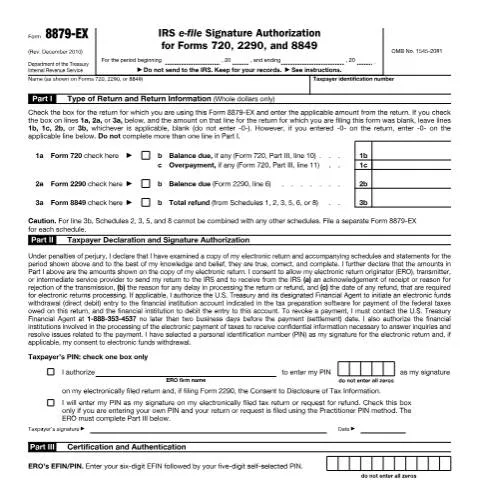
At its core, the IRS Form 8879-EX is an e-file signature authorization. When you're filing Forms 720, 2290, or 8849, this document serves as your official consent for an electronic return originator (ERO) to file your tax return electronically. It’s not just a checkbox; it’s a means of ensuring that all parties involved—taxpayers and EROs alike—are on the same page regarding the submission of sensitive tax information.Specific Situations for Filing Form 8879-EX
This form is predominantly used in the following situations:- Excise Tax Returns: If you're submitting Forms 720, 2290, or 8849, you'll be required to utilize Form 8879-EX to authorize e-filing.
- Consents for Electronic Funds Withdrawal: If you opt for direct debit payments, this form also facilitates that authorization.
- Identification through PIN: The form allows you to establish a personal identification number (PIN) as your signature during the e-filing process. This is critical for securing your submission.
Who Needs to Complete Form 8879-EX?
Understanding who is affected by Form 8879-EX is crucial. Generally, this form is necessary for any taxpayer filing electronic excise tax returns. Below are various profiles that typically require this document:Profiles of Taxpayers
- Business Owners: Those who run businesses, especially in sectors subject to excise taxes, will find this form indispensable.
- Tax Professionals: Accountants and EROs assisting clients with excise tax filings must manage this form effectively.
- Partnerships and Corporations: Entities that file for excise taxes are also among those obligated to use Form 8879-EX.
Exceptions and Specific Cases
While the above groups generally need to file Form 8879-EX, there are exceptions:- Non-Profit Organizations: If a non-profit does not engage in activities subject to excise tax, they may not need this form.
- Individuals with No Excise Tax Liability: If your business is exempt from excise taxes, you won't need to submit this authorization.
Step-by-Step: Completing IRS Form 8879-EX
Successfully completing IRS Form 8879-EX requires attention to detail. Below is a breakdown of how to fill in each section to ensure compliance.Part I: Type of Return and Return Information
- Check the corresponding box for the return being filed—Form 720, 2290, or 8849.
- Enter the applicable amounts from the return. If no balance is due, leave the respective fields blank.
- Ensure that you complete only one line in this section to avoid confusion.
Part II: Taxpayer Declaration and Signature Authorization
This section is crucial as it involves a declaration under penalties of perjury.- Review your return meticulously before declaring it as true and complete.
- Provide your PIN, which will serve as your electronic signature. Ensure it is not all zeros.
- Authorize the ERO to submit your return to the IRS on your behalf.
Part III: Certification and Authentication
In this part, the ERO will need to enter specific information:- Fill out the EFIN (Electronic Filing Identification Number) and a five-digit self-selected PIN.
- Have the ERO sign and date this section to validate the submission.
Common Challenges and How to Overcome Them
While filing Form 8879-EX is relatively straightforward, challenges can arise. Here are some common issues and how to resolve them:Missing Information
Ensure that all fields are filled out accurately. Missing information can lead to delays in processing your return.Incorrect PIN Usage
If you inadvertently enter an incorrect PIN, it can complicate the e-filing process. Double-check your PIN and confirm with your ERO if unsure.Failing to Retain the Form
Remember, Form 8879-EX should not be sent to the IRS, but it is essential to keep it for your records. Failure to do so may lead to difficulties in future correspondence with the IRS.The Timeline: Key Dates for Filing
Filing taxes is a time-sensitive matter. Understanding your deadlines is crucial for compliance.When to File Form 8879-EX
Generally, Form 8879-EX needs to be completed before the electronic return is submitted. Here are some critical dates to note:| Form Type | Filing Deadline |
|---|---|
| Form 720 | Last day of the month following the end of the quarter (April 30 for Q1, July 31 for Q2, etc.) |
| Form 2290 | Due by the last day of the month following the end of the tax period (August 31 if filing for the year ending June 30) |
| Form 8849 | Generally, filed by the due date for the return to which it relates. |
What Happens After Filing Form 8879-EX?
Once you've submitted your Form 8879-EX and authorized your ERO to file electronically, what's next?Post-Submission Acknowledgment
Once your e-filing is submitted:- The ERO will receive an acknowledgment from the IRS confirming receipt of your return.
- In the case of rejections, the ERO will also receive the reasons for rejection, allowing for quick corrections.
Monitoring Your Filing Status
After submission, you can track your return and any refunds. Utilize the appropriate IRS tools for monitoring your filing status.Dealing with Refusal or Rejection Issues
Even with meticulous preparation, issues can arise. Here’s how to address them.Handling a Rejected Return
If your return is rejected:- Contact your ERO immediately to understand the reason for rejection and rectify any issues.
- Re-submit your Form 8879-EX after corrections are made.
What to Do if You Forget to File
Forgetting to submit Form 8879-EX before your return can lead to delays:- Act quickly: Complete and submit the form as soon as possible to avoid penalties.
- Consult with your ERO for advice on how to proceed, especially if deadlines are looming.
The Regulatory Framework: Understanding the Background
The development and implementation of Form 8879-EX are contextualized within federal tax administrative procedures. Governed by the Administrative Procedure Act, it's essential to understand the legislative backdrop.Historical Context
This form was introduced in response to the increasing complexity of tax regulations and the need for secure electronic filing methods. The introduction of electronic filing has made tax submissions more efficient and accessible, helping taxpayers avoid common pitfalls associated with paper filing.Current Regulations and Guidelines
The IRS updates and revises forms regularly. Form 8879-EX, for example, was last revised in December 2010. Staying updated with IRS guidelines is critical for compliance and avoiding issues related to outdated practices.Final Thoughts: The Importance of Compliance and Preparedness
In conclusion, while Form 8879-EX may appear to be just another step in the tax filing process, it serves as a crucial pivot between you and the IRS. Proper completion and understanding of this form can spare you from potential headaches down the line. Being proactive in filing this form, understanding your responsibilities, and recognizing the importance of accurate information will ease the tax filing experience significantly. Always consult the official IRS guidelines or your ERO for specific questions or concerns to ensure that your tax filing remains compliant and timely.Understanding IRS Form F8879-EX: The Purpose and Benefits
IRS Form F8879-EX, the IRS e-file Signature Authorization for Exempt Organizations, is a vital form for exempt entities seeking to electronically file their tax returns. This form authorizes the e-filing, ensuring that the electronic submission is valid under federal law. Exempt organizations, which may include charities, educational institutions, and certain nonprofits, can utilize this form to streamline their filing process.
The significance of Form F8879-EX cannot be understated. It provides a secure way for authorized individuals within the organization to sign the tax return electronically, eliminating the need for paper submissions. This not only expedites the filing process but also enhances the accuracy of submissions, as electronic systems tend to have built-in checks for common errors.
Moreover, completing Form F8879-EX can have broader implications for an organization’s operations. By ensuring compliance with IRS requirements, organizations can maintain their tax-exempt status, avoid penalties, and build credibility with donors and stakeholders. The form also helps in keeping detailed records, as it serves as proof of authorization for the e-filed return, which could be beneficial in the event of an audit.
Eligibility Requirements for Using Form F8879-EX
While Form F8879-EX is tailored for exempt organizations, there are specific eligibility criteria that must be met before using this form. Generally, the organization must qualify as a tax-exempt entity under the Internal Revenue Code, which includes libraries, schools, and charitable organizations among others.
In addition to entity qualifications, certain roles within the organization are recognized for signing the form. Typically, officers such as the president or treasurer, or other individuals authorized by the organization’s governing body, are eligible to provide signatures. It’s important to note that the IRS requires that the e-filing be completed by a person with the authority to sign the organization's tax return, ensuring that proper oversight exists.
Organizations should also be aware that they need to have an Employer Identification Number (EIN). This unique identifier is essential for all tax-related filings and activities. If your exempt organization does not have an EIN, it will be necessary to apply for one through the IRS before proceeding with Form F8879-EX.
Common Mistakes to Avoid When Filing Form F8879-EX
Filing IRS Form F8879-EX can be straightforward, but several common pitfalls can complicate the process. Understanding these mistakes can save organizations valuable time and resources.
- Incomplete Information: One prevalent issue arises from filling out the form with incomplete or inaccurate information. Ensure that all required fields are fully completed, including the organization's name, EIN, and the signature of the authorized individual. Double-check that the details match those on the organization's prior filings to avoid discrepancies.
- Incorrect Signatures: Only designated officers or authorized personnel should sign the form. If someone without proper authority signs, it can lead to the rejection of the e-filing. Organizations should maintain a record of who is authorized to sign to prevent such issues.
- Failure to Retain Copies: It’s imperative that organizations maintain copies of both the submitted Form F8879-EX and the tax return it accompanies. These documents will be crucial for record-keeping and may be necessary if the IRS requests additional information or if an audit occurs.
Awareness and education about these common mistakes can bolster an organization’s compliance strategy and enhance the efficiency of tax filing.