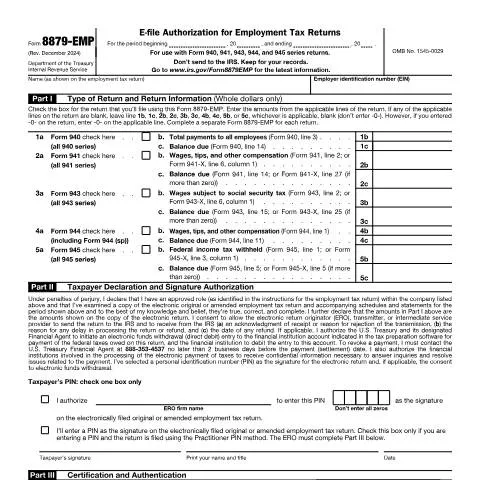
Navigating the E-Filing Landscape: Understanding Form 8879-EMP
Filing employment tax returns electronically is a crucial step for businesses, ensuring compliance with federal regulations while streamlining the submission process. Form 8879-EMP, officially known as the IRS Form f8879emp, plays a vital role in this context. This article aims to unpack the intricacies of Form 8879-EMP, including its significance, the right way to fill it out, and the timelines involved.
What is Form 8879-EMP and Why Does It Matter?
Form 8879-EMP is not just another piece of paperwork; it serves as the electronic signature for various employment tax returns, including Forms 940, 941, 943, 944, and 945. This form provides a way for taxpayers and electronic return originators (EROs) to authorize e-filing of these returns using a personal identification number (PIN). Each time a business prepares to submit employment tax returns electronically, Form 8879-EMP ensures that the necessary permissions are in place.
Understanding the Role of EROs
The ERO is the intermediary responsible for electronically submitting the return to the IRS. By using Form 8879-EMP, taxpayers can authorize these professionals to act on their behalf, simplifying the submission process. This relationship is critical, especially for businesses that may not have the expertise or resources to manage their employment tax filings independently.
Who Needs to Complete Form 8879-EMP?
This form is not just for anyone; it specifically targets employers and business owners who are filing employment tax returns. Whether you're a small business owner or manage payroll for a larger organization, if you are responsible for filing employment taxes, this form is essential.
Specific Scenarios Requiring Form 8879-EMP
- New Businesses: If you're newly registered and starting to hire employees, you'll need to file your first set of employment taxes using Form 8879-EMP.
- Amended Returns: Businesses needing to correct previously submitted tax returns will also utilize Form 8879-EMP as part of the e-filing process.
- Tax Professionals: Certified EROs assisting multiple clients will require this form for each separate return they file on behalf of their clients.
Breaking Down the Timeline: When to File?
Timely submission of employment tax returns is critical to avoid penalties and interest charges. Understanding the deadlines associated with Form 8879-EMP is imperative for compliance.
Key Filing Dates
| Form Type | Filing Deadline |
|---|---|
| Form 940 | January 31 of the following year |
| Form 941 | Last day of the month following the quarter |
| Form 943 | January 31 of the following year |
| Form 944 | January 31 of the following year |
| Form 945 | January 31 of the following year |
Each form has specific deadlines, and failing to meet those can result in significant penalties. Therefore, businesses must maintain a calendar to track these important dates.
How to Properly Fill Out Form 8879-EMP
Completing Form 8879-EMP is a straightforward process, but there are nuances at each step that practitioners should be aware of to avoid mistakes.
Section Breakdown
- Part I: Type of Return and Return Information
- Identify the specific type of return you are filing (e.g., Form 940, 941, etc.) and provide the relevant financial information.
- Ensure accuracy in the amounts listed; any discrepancies can lead to issues down the line.
- Part II: Taxpayer Declaration and Signature Authorization
- This section requires the taxpayer to declare the truthfulness of the filing. Careful attention must be paid to ensure all information is correct.
- The taxpayer must also select a PIN, which acts as their electronic signature. It’s essential to avoid using easily guessed numbers.
- Part III: Certification and Authentication
- The ERO fills this part, certifying that the return is filed according to IRS guidelines.
- Provide both the EFIN and PIN accurately, as these will authenticate the submission.
Common Pitfalls to Avoid When Filing
Even a minor mistake on Form 8879-EMP can delay the processing of your employment tax returns and potentially incur fines. Here are some common errors to watch for:
Top Mistakes
- Incorrect EIN: Always double-check your Employer Identification Number; any error here can lead to severe complications.
- Missing Signatures: Both the taxpayer and the ERO must sign the form. Failure to do so makes the form invalid.
- Improper Amounts: Ensure all financial figures match those on the employment tax return. Inconsistencies can flag your submission for rejection.
What Happens After Submission?
Once you've submitted your employment tax returns along with Form 8879-EMP, there are several steps to monitor to ensure everything processes smoothly.
Tracking Your Submission
- IRS Acknowledgment: After submission, the IRS will send back an acknowledgment of receipt or a reason for rejection. Keep an eye on your records for this.
- Payment Processing: If applicable, ensure that any electronic funds withdrawal for taxes owed is completed as authorized in Part II of the form.
- Delays or Issues: If you experience any delays in processing, follow up with the IRS by contacting their dedicated helplines.
Handling Complications: Refusals and Errors
In the event that your submission encounters problems, knowing how to address them is essential for any business owner.
Steps to Take in Case of Issues
- Review the Rejection Notice: Understand why the IRS rejected your return. This can help you avoid the same mistake in future submissions.
- Correct and Resubmit: Make any necessary corrections and resubmit Form 8879-EMP along with the employment tax return as soon as possible.
- Reach Out for Help: If you're unsure about the next steps, consider consulting with a tax professional who can guide you through the process.
Final Thoughts on Form 8879-EMP
Mastering the complexities of Form 8879-EMP is crucial for any business looking to maintain compliance with IRS regulations. This form is not merely a bureaucratic requirement; rather, it is a significant component of the e-filing process for employment tax returns. By understanding the nuances of filling it out correctly and knowing the associated timelines, businesses can navigate the landscape of employment taxes effectively.
Understanding IRS Form F8879-EMP: An In-Depth Look
IRS Form F8879-EMP, also known as the "IRS e-file Signature Authorization for Form 1065 and 1065-B," is designed for partnerships and certain limited liability companies (LLCs) that choose to e-file their returns. This form plays a crucial role in the electronic filing process by allowing a designated partner or member to sign the return electronically, thereby meeting IRS requirements for electronic submissions.
To ensure compliance, it is essential for partnerships to understand the implications of using Form F8879-EMP. Notably, this form enables a designated partner to authorize the electronic filing of the partnership tax return without the need for obtaining physical signatures from all partners. This convenience is particularly beneficial for large partnerships where gathering signatures can be a logistical challenge.
When completing Form F8879-EMP, the designated partner must provide their name, title, and Social Security Number (SSN) or Employer Identification Number (EIN), along with the necessary details related to the partnership. Furthermore, it is critical to retain the completed form in your records for at least three years, as the IRS may request it during audits or reviews to verify the signatures associated with electronic filings.
In addition, partnerships must ensure that the e-file provider they choose is authorized by the IRS to transmit e-filed returns. This adds an additional layer of security and compliance to the e-filing process, as authorized providers must adhere to specific standards set by the IRS to protect taxpayer information.
Common Mistakes to Avoid When Filing Form F8879-EMP
Filing Form F8879-EMP is a straightforward process, but certain common mistakes can lead to delays or issues with the IRS. Understanding these pitfalls can aid partnerships in ensuring a smooth filing experience.
One frequent error is the failure to accurately complete the designated partner’s information. If the SSN or EIN is incorrect, it can cause delays in the processing of the return and potentially lead to penalties. Additionally, neglecting to include the correct partnership information, such as the legal name and address, can also result in complications.
Another mistake is related to the timing of the filing. Partners must ensure that Form F8879-EMP is signed before the partnership return is transmitted electronically. If the designated partner fails to sign the form before the transmission of Form 1065 or 1065-B, the IRS may reject the return, necessitating a resubmission.
Moreover, partnerships should avoid assuming that they can bypass the need for Form F8879-EMP if they choose to file their return on paper. The form is specifically designed for e-filing, and attempting to use it in conjunction with paper filings can lead to confusion and complications with the IRS. It’s essential to recognize that Form F8879-EMP is not required when filing paper returns.
Lastly, ensure that the completed form is securely stored in compliance with IRS record-keeping requirements. Partnerships are advised to retain Form F8879-EMP along with supporting documents for a minimum of three years after the return is filed, as the IRS may request this documentation during audits.
Practical Tips for Efficient e-Filing with Form F8879-EMP
To enhance the efficiency of e-filing using Form F8879-EMP, partnerships can adopt several practical strategies that streamline the process while ensuring compliance with IRS regulations.
First and foremost, establish a clear communication strategy among partners. Regular meetings to discuss filing responsibilities and deadlines can help ensure that everyone is on the same page regarding the e-filing process. Designating a specific partner to oversee the administrative tasks related to electronic filing can also help centralize responsibilities, reducing the likelihood of miscommunication.
Utilizing reliable tax preparation software that is compatible with e-filing can further simplify the completion and submission of Form F8879-EMP. Many tax software programs offer built-in guidance for filling out various forms, including F8879-EMP, and can automatically generate required fields based on the partnership’s tax data. This feature can minimize data entry errors and save valuable time during the filing process.
In addition, consider setting internal deadlines that precede the official filing deadline. This proactive approach allows adequate time for reviewing the completed form, obtaining the designated partner’s signature, and addressing any potential issues that may arise before the IRS deadline. For partnerships with multiple partners, this internal deadline can be particularly crucial in ensuring timely and accurate submissions.
Finally, stay informed about any changes to IRS regulations pertaining to electronic filing and the use of Form F8879-EMP. The IRS periodically updates its guidelines, and being aware of these changes can help partnerships remain compliant and avoid unintended mistakes during the filing process.