Understanding the APP9E Form: How to Request a Review of a Legal Aid Decision in the UK
If you have received a decision from the Legal Aid Agency that you believe is incorrect or unfair, the APP9E form provides a formal process to request a review. This official document is designed to give individuals the opportunity to challenge decisions made by the director of legal aid casework, ensuring that cases are reconsidered with all relevant information taken into account.
What Is the Purpose of the APP9E Form?
The APP9E is an application form used specifically to request a review of a decision made by the director of legal aid casework. Whether the decision relates to eligibility, funding, or other aspects of legal aid, this form allows applicants to formally ask for a reconsideration. The process is part of the legal aid framework aimed at maintaining fairness and transparency in the administration of legal support.
Who Should Complete the APP9E Form?
This form is intended for individuals who have been notified of a decision by the Legal Aid Agency and wish to challenge it. Applicants might include clients, legal representatives, or other parties directly affected by the decision. It is important to ensure that the form is filled out accurately and completely to avoid delays in processing the review.
How to Fill Out the APP9E Form
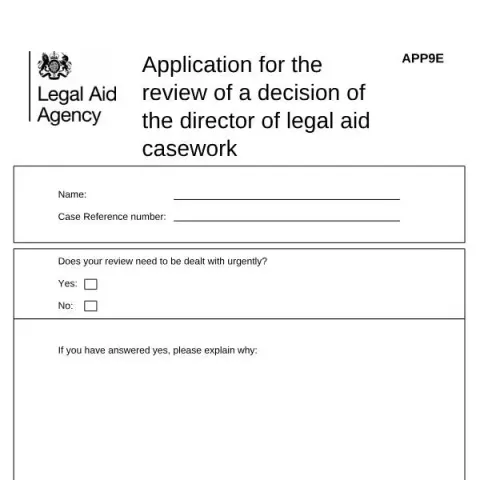
Section 1: Personal and Case Details
- Name: Enter your full name as it appears in the legal aid case records.
- Case Reference Number: Provide the unique reference number associated with your legal aid case. This helps the agency locate your file quickly.
- Urgency: Indicate whether your review needs to be dealt with urgently by selecting 'Yes' or 'No'. If 'Yes', provide a detailed explanation of why immediate attention is necessary.
Section 2: Grounds for Review
In this section, you must clearly explain why you believe the original decision was incorrect. It is essential to specify the reasons, referencing the decision letter you received. If you have additional information or documentation that was not available at the time of the original decision, include details here and attach any relevant documents.
Section 3: Signature and Date
- Signature: Sign the form to confirm that the information provided is accurate.
- Date: Enter the date when you are submitting the form.
Supporting Documents and Evidence
To strengthen your review request, include any supporting documentation that can substantiate your grounds for appeal. This might include new evidence, clarification of facts, or missing information that could influence the decision. Make sure to send copies rather than original documents, and clearly label each attachment for easy reference.
Where and How to Submit the APP9E Form
The completed form should be sent to the address or email specified in the decision letter or on the official guidance provided by the Legal Aid Agency. Ensure that all sections are completed and that supporting documents are attached before submission. Keep a copy of the filled form and all attachments for your records.
Fill in your form directly online
No printing: type your details into the boxes of the official form, tick, then download the PDF ready to send.
- 1Type into the form boxes
- 2Tick in one click
- 3Save and download the PDF
Common Mistakes to Avoid When Completing the APP9E
- Incomplete Information: Failing to fill out all required fields can delay the review process.
- Vague Grounds for Review: Providing unclear or insufficient reasons may result in your request being rejected or delayed.
- Missing Supporting Evidence: Not attaching relevant documents can weaken your case.
- Incorrect Contact Details: Ensure your contact information is accurate to receive updates regarding your review.
Next Steps After Submitting the APP9E
Once your application is received, the Legal Aid Agency will review the grounds for appeal. They may contact you for further information or clarification. The review process can take several weeks, depending on the case complexity and urgency indicated. You will be notified of the outcome in writing, and if the review is successful, the original decision will be reconsidered accordingly.