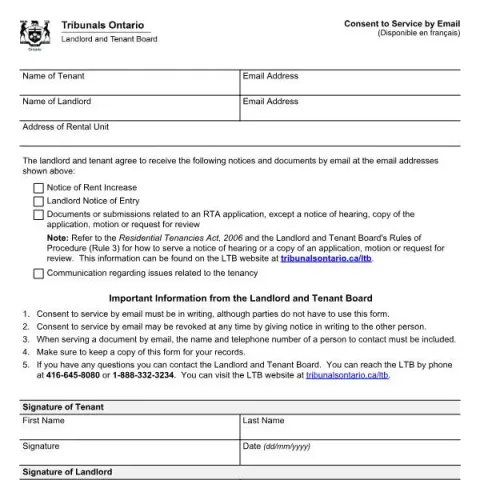
Understanding the "Consent to Service by Email" Form for Ontario Landlord and Tenant Board
If you are involved in a tenancy dispute or need to communicate with the Landlord and Tenant Board (LTB) in Ontario, you may be asked to provide a "Consent to Service by Email" form. This official document allows landlords and tenants to agree to receive notices and important documents electronically, streamlining communication and ensuring timely delivery of information related to tenancy issues.
What is the Purpose of the Form?
The primary purpose of this form is to authorize the Landlord and Tenant Board to send notices and legal documents via email instead of traditional mail or personal service. This can include:
- Notice of Rent Increase
- Landlord Notice of Entry
- Documents or submissions related to an Residential Tenancies Act (RTA) application, except notices of hearing, copies of applications, motions, or requests for review
- Communication regarding issues related to the tenancy
By completing and signing this form, both parties agree to receive these notices electronically, which can help speed up communication and reduce delays in resolving tenancy matters.
Who Should Fill Out This Form?
This form is intended for tenants and landlords who want to receive notices and documents via email. Both parties must agree to this arrangement and provide their contact information. It is especially useful if both parties prefer digital communication or if physical delivery is impractical.
How to Complete the Form
Filling out the form is straightforward. Follow these steps:
- Enter your full name in the designated fields for the tenant and landlord.
- Provide your email addresses accurately, as these will be used for all electronic communication.
- Specify the address of the rental unit to ensure the notices are correctly linked to the tenancy.
- Sign and date the form to confirm your agreement to receive notices electronically.
Both parties must sign and date the form for it to be valid. Keep a copy for your records once completed.
Fill in your form directly online
No printing: type your details into the boxes of the official form, tick, then download the PDF ready to send.
- 1Type into the form boxes
- 2Tick in one click
- 3Save and download the PDF
Important Information and Considerations
- Consent is voluntary and can be revoked at any time by providing written notice to the other party.
- When serving documents by email, include the name and telephone number of a contact person.
- Keep a copy of the signed form for your records, as proof of consent.
- If you have questions or need assistance, you can contact the Landlord and Tenant Board by phone at 416-645-8080 or 1-888-332-3234. Visit their website at tribunalsontario.ca/ltb for additional information.
Where and How to Submit the Form
The completed and signed form can be submitted to the Landlord and Tenant Board through their official channels. Many forms can be uploaded via the Board’s online platform, or sent by mail or in person, depending on the instructions provided by the LTB. Always ensure you retain a copy of the submitted form for your records.
Common Errors to Avoid When Filling Out the Form
- Using incorrect or outdated email addresses.
- Failing to sign and date the form, rendering it invalid.
- Not keeping a copy after submission.
- Providing incomplete or inaccurate contact details, which could delay communication.
By carefully completing this form, tenants and landlords in Ontario can ensure smoother communication with the Landlord and Tenant Board, facilitating faster resolution of tenancy issues and legal notices through email.