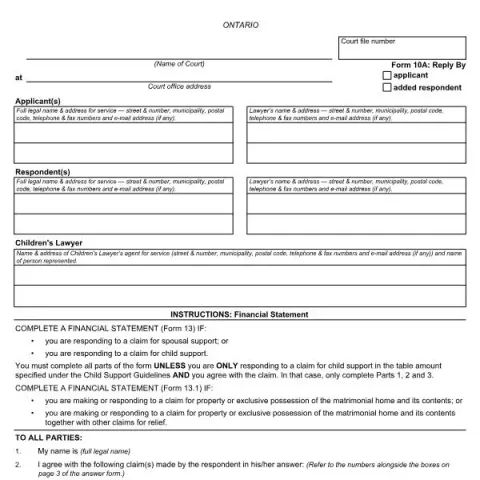
Understanding the Ontario Courts Form 10A: Reply
If you are involved in a family law case in Ontario, you may come across the Form 10A: Reply. This official document is used by parties to respond to claims made by the other side in a legal proceeding. Whether you are an applicant or a respondent, understanding how to properly complete and submit this form is essential to protect your rights and ensure your case proceeds smoothly.
What is the purpose of the Form 10A: Reply?
The primary role of the Form 10A is to officially reply to allegations or claims made by the opposing party in a family law matter. This form allows you to state which claims you agree with, which you dispute, and to set out your position regarding the issues at hand. It is a critical step in the litigation process, as it clarifies each party’s stance and helps the court understand the dispute.
Specifically, the form is used to:
- Respond to claims for spousal or child support
- Address claims related to property or exclusive possession of the matrimonial home
- Indicate agreement or disagreement with specific claims made by the other party
- Request that the court dismiss certain claims, with or without costs
Who should fill out the Form 10A?
This form is intended for the respondent—meaning the person who has been served with a family law application or claim. However, in some cases, an applicant may also need to complete it if they wish to respond to the other party’s assertions. It’s important to complete the form carefully, as it forms part of the official court record and influences the subsequent steps in your case.
How to complete the Form 10A: Reply
1. Fill in the Court Details
Start by entering the court file number, the name of the court, and the court office address. These details identify your case and ensure your reply is properly filed.
2. Provide Parties’ Information
List the full legal names and addresses for service of both the applicant and respondent, including telephone, fax, and email contact information. If a lawyer is involved, include their details as well.
3. Respond to Claims
Indicate which claims made by the other party you agree with and which you dispute. Use the numbered boxes on page 3 of the form to specify each claim. Be clear and precise to avoid confusion.
4. State Your Position
Use the space provided to outline the key facts supporting your position. Number each paragraph for clarity. Attach additional sheets if necessary.
Fill in your form directly online
No printing: type your details into the boxes of the official form, tick, then download the PDF ready to send.
- 1Type into the form boxes
- 2Tick in one click
- 3Save and download the PDF
5. Sign and Date
Conclude by signing and dating the form. Your signature confirms that the information provided is true to the best of your knowledge.
Additional Instructions and Considerations
- Financial Statements: If your case involves claims for spousal support, child support, or property division, you may need to complete additional forms such as the Financial Statement (Form 13) or the Financial Statement (Form 13.1).
- Completeness: Ensure all relevant claims are addressed, and do not leave blank spaces on the form. Incomplete forms can delay your case or lead to unfavorable rulings.
- Filing and Service: Submit the completed form to the court office and serve a copy on the other party, following the court’s rules for service.
Common Errors to Avoid
- Failing to specify which claims you agree or disagree with
- Leaving sections blank or incomplete
- Submitting the form past the deadline set by the court
- Neglecting to sign and date the document
By carefully completing and submitting the Form 10A: Reply, you ensure that your side of the story is officially recorded and considered by the court. If you are unsure about any part of the process, it is advisable to seek legal advice or assistance from a family law professional.