Understanding the Request for Clerk’s Order on Consent – Ontario Superior Court of Justice
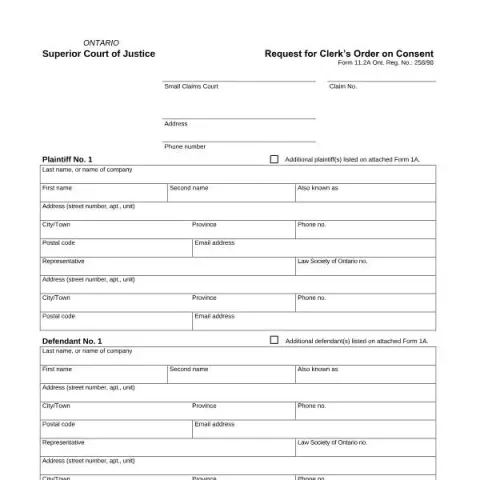
If you are involved in a legal matter under the jurisdiction of the Ontario Superior Court of Justice, you may encounter the Form 11.2A: Request for Clerk’s Order on Consent. This official court form is used to seek a court clerk’s approval for certain procedural or substantive requests when all parties agree on the proposed order. Here, we will guide you through the purpose of this form, how to prepare it, and the process for filing and follow-up.
What Is the Purpose of Form 11.2A?
The Request for Clerk’s Order on Consent is a procedural document that allows parties involved in a case to obtain a court clerk’s approval for specific actions without requiring a formal hearing before a judge. This is typically used when all parties agree on certain adjustments or dismissals related to the case, such as setting aside default judgments, amending claims, or dismissing claims entirely.
The form streamlines the process by enabling parties to submit their joint requests directly to the court clerk, provided all parties have consented and signed the form. It is an efficient way to resolve procedural issues swiftly, especially when the matter is straightforward and uncontested.
Preparing Your Request for Submission
Gathering Necessary Information
- Case details: Include the claim number, court location, and contact information for the court.
- Parties involved: List the plaintiff(s) and defendant(s), including their full names, addresses, and contact details. If applicable, include their legal representatives’ information.
- Specific orders sought: Clearly specify the orders you are requesting, such as setting aside default judgments, dismissing claims, or amending pleadings.
Obtaining Signatures
All parties affected by the request, including any to be added, deleted, or substituted, must sign the form. This demonstrates their agreement and consent to the proposed court order. Ensure that signatures are accompanied by printed names and dates.
Additional Documentation
Depending on the nature of your request, you may need to attach relevant documents, such as amended pleadings or settlement agreements. Ensure copies are prepared as per court requirements.
Filing and Submission Process
How to File
The form can typically be filed in person at the court office or through the court’s digital filing platform if available. Confirm with the local court registry for specific procedures, especially during periods of remote operations.
Follow-Up and Court Disposition
Once the form is filed, the court clerk reviews the request. If everything is in order and all signatures are valid, the clerk will issue the requested order. The court’s decision will be documented on the form, which becomes part of the official court record.
Fill in your form directly online
No printing: type your details into the boxes of the official form, tick, then download the PDF ready to send.
- 1Type into the form boxes
- 2Tick in one click
- 3Save and download the PDF
Important Considerations
- Signatures are mandatory: All parties and witnesses must sign the form for it to be valid.
- Timeliness: Submit your request well before any scheduled hearings to avoid delays.
- Legal advice: While this process is straightforward, consulting with a lawyer or legal professional can ensure your requests are appropriately drafted and compliant with court rules.
Contacts and Resources
For more information or assistance, contact the Ontario Superior Court of Justice registry at your local courthouse. Additionally, the court’s official forms are accessible online, and detailed instructions are often available to guide you through the process.
Remember, using the Form 11.2A correctly can save time and facilitate smoother case management, especially when all parties are in agreement. Ensure that you follow all procedural requirements carefully to avoid delays or rejection of your request.