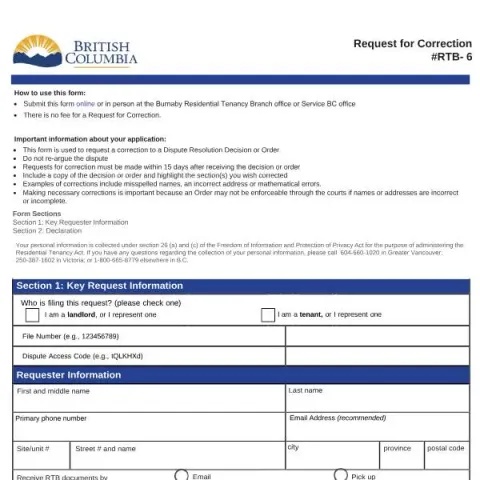
Understanding the "Request for Correction" Form (RTB-6) for Residential Tenancy Disputes in British Columbia
If you are involved in a residential tenancy dispute in British Columbia and have received a decision or order from the Residential Tenancy Branch (RTB), you may find that some details are incorrect or need clarification. The official "Request for Correction" form, designated as RTB-6, provides a straightforward process to amend these errors. This article explains the purpose of the form, who should use it, and how to complete it effectively.
What Is the RTB-6 "Request for Correction" Form?
The RTB-6 form is an official document used to request corrections to a decision or order issued by the Residential Tenancy Branch. Typical errors that can be addressed include misspelled names, incorrect addresses, mathematical mistakes, or other obvious inaccuracies that could impact the enforceability of the order. It is important to note that this form is not intended for re-arguing the dispute itself but solely for correcting clerical or factual errors in the issued documents.
Who Should Use This Form?
This form is applicable to tenants, landlords, or their authorized representatives who have received a decision or order from the RTB and have identified errors needing correction. It is essential to submit the request within 15 days of receiving the document, as late submissions may not be considered. Both parties should ensure that the requested correction is clear and supported by the relevant documentation, such as a copy of the original decision or order.
How to Complete the RTB-6 Form: Step-by-Step
1. Gather Necessary Information
- Decision or order document received from the RTB
- Copy of the original decision or order highlighting the errors
- Personal identification details, including your Social Insurance Number (SIN) and contact information
2. Fill Out the Key Requester Information
In this section, specify whether you are the tenant, landlord, or their representative. Provide your full name, phone number, email address, and mailing address. Indicate whether you prefer to receive RTB correspondence via email or in person.
3. Identify the Document and Error
Specify which document you are seeking to correct: a decision or an order of possession or monetary order. Include the date of the original document and the date you received it. Clearly describe the error(s)—whether they are typing, grammatical, mathematical, or obvious omissions—and specify the page numbers or sections involved.
4. Sign and Declare
By signing the form, you declare that the information provided is true and complete to the best of your knowledge. You also confirm that you have the authority to request the correction and understand the legal implications of providing false information. The form must be signed and dated to validate the request.
Submitting the Request and Next Steps
The completed RTB-6 form can be submitted either online through the BC government's tenancy dispute platform or in person at the Burnaby Residential Tenancy Branch office or a Service BC office. There is no fee associated with submitting a Request for Correction. After submission, the RTB will review your request and notify you of the outcome, which may involve further clarification or confirmation of the correction.
Fill in your form directly online
No printing: type your details into the boxes of the official form, tick, then download the PDF ready to send.
- 1Type into the form boxes
- 2Tick in one click
- 3Save and download the PDF
Why Is Correcting Errors Important?
Ensuring that the decision or order accurately reflects the correct names, addresses, and details is crucial for enforcement purposes. An incorrect or incomplete document may not be enforceable through the courts, potentially delaying or complicating resolution efforts. Therefore, promptly requesting corrections helps maintain the integrity and enforceability of the RTB's decisions.
Additional Resources and Contact Information
For questions about the form or the correction process, you can contact the RTB's general inquiries line or visit the official website. Remember to keep copies of all documents submitted and received throughout the process for your records.