Understanding the Request a Hearing Recording Form (RTB-54) for Residential Tenancy Disputes in British Columbia
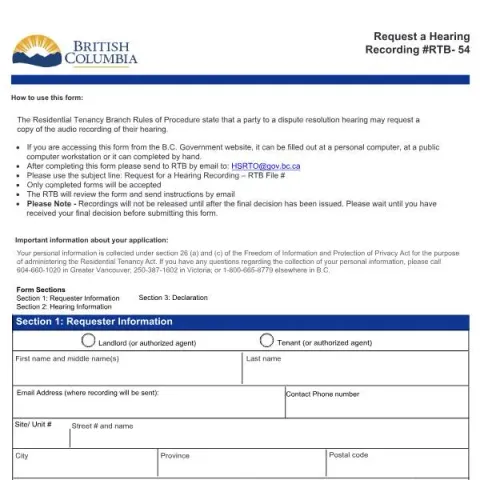
If you are involved in a dispute related to a residential tenancy in British Columbia, you may find it helpful to access a recording of the hearing to better understand what transpired or to prepare for potential legal proceedings. The Request a Hearing Recording (RTB-54) form is the official document used by the Residential Tenancy Branch (RTB) to facilitate this process. This article provides a comprehensive overview of who should complete this form, how to do so correctly, and important considerations to keep in mind.
Who Should Fill Out the RTB-54 Form?
This form is intended for parties involved in a tenancy dispute who wish to obtain an audio recording of their hearing. Typically, this includes tenants, landlords, or their authorized agents who participated in the hearing and believe that reviewing the recording will assist in understanding the proceedings or supporting future legal actions such as judicial reviews. It is important to note that only individuals with proper authority to request the recording should submit the form, and all information provided must be accurate and truthful.
How to Complete the RTB-54 Form
Step 1: Provide Your Personal and Contact Information
- Name and Address: Enter your full name, including middle names if applicable, and your residential address.
- Email and Phone Number: Provide a valid email address where the recording will be sent and a contact phone number.
Step 2: Specify Hearing Details
- Hearing Date(s): List the date(s) when the hearing occurred.
- File Number: Include the dispute file number assigned by the RTB.
- Hearing Time(s): Note the scheduled time(s) of the hearing.
- Access Code (if applicable): Enter the teleconference access code provided for remote hearings.
Step 3: Provide Dispute Address
- Fill in the address where the dispute took place, including site/unit number, street, city, province, and postal code.
Step 4: Declaration and Signature
By signing the form, you confirm that you have authority to request the recording, and that all information provided is accurate. You also agree to use the recording solely for the purposes outlined by the RTB, such as understanding the hearing or supporting legal reviews. The declaration must include the date, your full name printed, and your signature.
Important Notes and Submission Process
The completed RTB-54 form can be filled out electronically if accessed via the BC Government website, or by hand. Once completed, it should be emailed to [email protected] with the subject line: Request for a Hearing Recording – RTB File #. Only fully completed forms will be processed.
It is crucial to wait until you have received the final decision from the RTB before submitting this request, as recordings are not released until after the hearing's conclusion. The RTB will review your request and provide further instructions via email.
Legal and Privacy Considerations
The collection of your personal information is governed by section 26 of the Freedom of Information and Protection of Privacy Act. Your details are used solely for administering the hearing recordings and related processes. The RTB emphasizes that recordings are intended to help parties understand the hearing, prepare for judicial reviews, or provide relevant evidence in court. They are not to be used for other purposes unless explicitly authorized.
Fill in your form directly online
No printing: type your details into the boxes of the official form, tick, then download the PDF ready to send.
- 1Type into the form boxes
- 2Tick in one click
- 3Save and download the PDF
Common Errors to Avoid
- Submitting incomplete or inaccurate information.
- Requesting recordings before receiving the final decision.
- Using the recording for unauthorized purposes.
- Failing to sign and date the declaration section.
By understanding these steps and considerations, you can effectively request a hearing recording from the Residential Tenancy Branch, ensuring your rights are protected and your case is well-prepared.