Diving Deep into IRS Form 8453-EG: Your Guide to E-Filing Complex Tax Returns
When navigating the intricate landscape of U.S. tax obligations, the IRS Form 8453-EG emerges as an essential tool for taxpayers dealing with high-value transfers and estates. This form is crucial in the electronic filing of several significant tax documents, including the United States Gift (and Generation-Skipping Transfer) Tax Return and the U.S. Estate Tax Return. Understanding its role, functions, and the implications of using it can make a significant difference in a taxpayer's experience.
Who's in the Hot Seat? The Profiles of Taxpayers Requiring Form 8453-EG
Form 8453-EG is not a one-size-fits-all document. It primarily caters to those who need to report substantial financial events. Let's break down who should be considering this form:
- Gift Tax Filers: Individuals who have made significant gifts exceeding the annual exclusion limit may need to use Form 709, which is where Form 8453-EG comes into play for e-filing.
- Estate Tax Filers: Executors or administrators of estates exceeding federal exemption limits must file Form 706 to report estate taxes.
- Generation-Skipping Tax Filers: Those engaging in transfers that skip generations must utilize this form to report such transfers accurately.
Each of these categories has its specific circumstances that may necessitate the use of Form 8453-EG. For instance, non-resident aliens who are required to file gift or estate tax returns must also complete this form along with Forms 709-NA or 706-NA.
The Functional Backbone: How Form 8453-EG Fits into the Filing Process
Form 8453-EG serves as an electronic signature and declaration for various estate and gift tax forms. It is particularly relevant when e-filing through an Electronic Return Originator (ERO). Here’s how it fits into the larger filing procedure:
- Engagement with an ERO: Taxpayers typically work with EROs who facilitate the e-filing process.
- Completion of Relevant Forms: Depending on their situation, taxpayers will complete Forms 709, 706, or their relevant variants.
- Submission of ERO: The completed return is forwarded to the ERO for filing.
- Signing Form 8453-EG: This form is filled out to provide authorization and confirm the accuracy of the return.
- Filing to the IRS: The ERO submits the entire package to the IRS electronically.
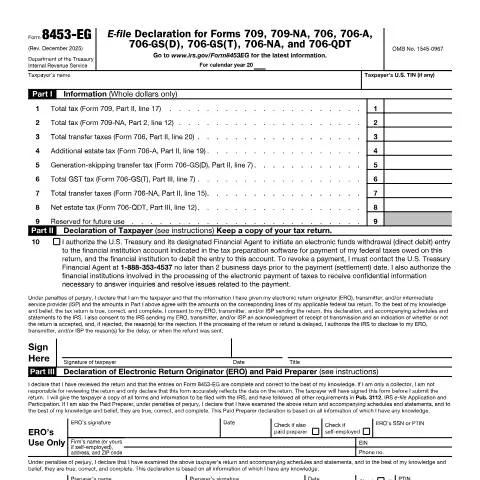
Navigating the Form: A Comprehensive Look at Filling Out 8453-EG
To ensure a seamless filing experience, it’s necessary to understand the sections of Form 8453-EG and the details required in each:
- Part I: Financial Information
- Line items for reporting total taxes across various associated forms, including Form 709 (gift tax) and Form 706 (estate tax).
- Each line corresponds to specific calculations from the associated forms. It’s crucial to ensure these figures are accurate.
- Part II: Taxpayer Declaration
- In this section, the taxpayer authorizes the U.S. Treasury to withdraw taxes owed electronically, if applicable.
- The declaration asserts that all information is true and correct, under penalties of perjury.
- Part III: ERO and Preparer Declarations
- ERO and any paid preparers must confirm that they have reviewed the tax return, ensuring its accuracy and completeness.
- Specific information regarding the ERO or preparer's credentials is also required here.
What to Expect After Filing: Tracking Your Submission
After submitting Form 8453-EG, there are several steps taxpayers can take to monitor their submission:
- Confirmation from the ERO: Most EROs will provide confirmation when the IRS has received the tax return.
- IRS Processing Times: Generally, the IRS processes e-filed returns faster than paper submissions, often within a few weeks, but delays can occur.
- Checking for Acceptance or Rejection: The IRS will notify the ERO whether the return has been accepted or rejected. If rejected, the reasons will be provided for correction.
Handling Hiccups: What to Do in Case of Issues or Rejections
If a taxpayer encounters any issues after filing, knowing how to address them promptly can save time and stress:
- Addressing Rejections: If the IRS rejects your return, contact your ERO immediately to understand the reason and correct any discrepancies.
- Missing Information: If essential information was overlooked, gather the necessary documentation, correct the return, and re-submit without delay.
- Follow Up with IRS: If there are significant delays post-submission, contacting the IRS directly can clarify issues related to processing times.
The Timeline of Events: Important Dates for Form 8453-EG
Understanding the timeline for using Form 8453-EG helps taxpayers stay compliant with IRS regulations:
| Event | Date/Deadline | Action Required |
|---|---|---|
| Filing Deadline for Gift and Estate Taxes | April 15 of the following year | Submit Form 8453-EG along with relevant forms. |
| Amend Filing (if necessary) | Within 3 years from the original filing date | File an amended return if there are corrections needed. |
| Tax Payment Due | April 15 or due date based on extension filed | Ensure electronic payment is authorized if applicable. |
Conclusion: Embracing the E-Filing Journey with Confidence
Form 8453-EG is a pivotal document for those navigating the complexities of U.S. gift and estate tax filings. Its proper completion and submission not only streamline the e-filing process but also ensure compliance with IRS regulations. By understanding the roles, requirements, and timelines associated with this form, taxpayers can navigate the intricacies of their obligations confidently and efficiently.
Understanding the Importance of Form F8453EG in Electronic Filing
Form F8453EG, specifically designed for the electronic filing of tax returns, plays a crucial role in the submission process. This form serves as a declaration of the taxpayer’s intent to file electronically and includes important authorizations and signatures necessary for IRS acceptance. Unlike traditional paper filings, using Form F8453EG authorizes a third party, often a tax professional, to act on behalf of the taxpayer, which is particularly beneficial for those who may not be well-versed in tax matters.
When filing electronically, taxpayers must ensure that all information on this form is accurate, as discrepancies can lead to delays or even rejections. Additionally, it is essential to be aware of the deadlines associated with electronic filings. For instance, if a taxpayer is filing for a return due on April 15, they must submit Form F8453EG before the same deadline to be considered compliant with IRS regulations. This form also includes a section for the taxpayer's tax identification number (TIN), which must match the information in the IRS records to prevent issues down the line.
Furthermore, taxpayers should keep a copy of Form F8453EG with their records, as it serves as proof of their filing method and authorization. In the event of an audit or a query from the IRS, having this documentation on hand can facilitate a smoother resolution process.
Common Mistakes and How to Avoid Them When Filing Form F8453EG
Filing Form F8453EG is relatively straightforward, yet many taxpayers make common mistakes that can hinder the electronic filing process. Here are some frequent errors and tips on how to avoid them:
- Incorrect Tax Identification Numbers: A common pitfall is failing to provide the correct TIN. This number must match what is on file with the IRS. Double-checking this number before submission can save time and prevent issues.
- Missing Signatures: Since Form F8453EG requires signatures from both the taxpayer and the paid preparer (if applicable), it’s vital to ensure that all required fields are completed. Missing signatures can result in rejections, requiring resubmission.
- Filing After the Deadline: As mentioned, Form F8453EG must be filed by the deadline associated with the tax return. Failing to file on time can lead to penalties and interest charges. Taxpayers should mark their calendars and set reminders to avoid this issue.
- Not Keeping Copies: After submission, it is important to keep a copy of Form F8453EG as part of your tax records. This serves as documentation in case of future inquiries or audits.
Additionally, utilizing resources from the IRS website and consulting with tax professionals can provide additional guidance and clarity when filling out this form, ensuring compliance and accuracy.
Alternative Options and Resources for Electronic Filing
While Form F8453EG is an integral part of the electronic filing process for certain taxpayers, there are alternative options and resources available for those seeking to file their taxes electronically. Here are some alternative pathways:
- IRS Free File Program: Many taxpayers may qualify for the IRS Free File Program, which allows eligible individuals to prepare and file their federal income tax returns for free using brand-name software. This can be particularly advantageous for those with straightforward tax situations and income below a certain threshold.
- Professional Tax Preparers: Taxpayers who prefer a hands-off approach may choose to work with professional tax preparers who can handle the entire filing process, including the use of Form F8453EG. This option provides peace of mind to those who may be uncomfortable navigating tax laws and requirements on their own.
- IRS e-File Options: The IRS provides various e-file options that often do not require Form F8453EG. Certain taxpayers may file their returns directly through IRS-approved e-file software, which simplifies the process and reduces paperwork.
Regardless of the method chosen, it’s important for taxpayers to stay informed about the various resources available to them and ensure they are following the latest IRS guidelines to avoid complications in their filing process.