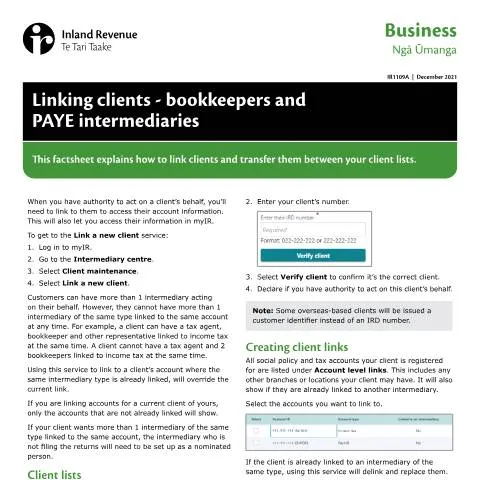
Understanding the Role of IR1109A: A Practical Guide for Bookkeepers and PAYE Intermediaries
Imagine you're a bookkeeper in New Zealand, managing multiple clients, each with their own unique financial situations. One day, a new client approaches you, needing assistance with their PAYE obligations. To access their Inland Revenue account, you'll need to navigate the intricacies of the IR1109A form, titled Linking clients - bookkeepers and PAYE intermediaries. This document serves as a crucial tool that not only strengthens your relationship with your clients but ensures compliance with tax regulations.
The Importance of Linking Clients
Linking clients correctly is essential for several reasons:
- Data Access: It provides you the authority to access your client's tax information via the myIR platform.
- Streamlined Communication: Once linked, your client can receive notifications and updates regarding their tax obligations.
- Multiple Intermediaries: A client may work with various intermediaries, each specializing in different areas, making links necessary for efficient management.
Who Needs to Complete Form IR1109A?
The IR1109A form is specifically designed for:
- Bookkeepers: Those managing the payroll and tax obligations for businesses.
- PAYE Intermediaries: Individuals or entities who handle PAYE (Pay As You Earn) on behalf of their clients.
Understanding the requirements for filling out this form can save time and avoid potential complications down the line.
Key Components of the IR1109A Form
Delving into the details of the IR1109A form is crucial for effective submission. Each section plays a pivotal role in ensuring accurate representation of your client’s situation.
Client Verification
The first step involves verifying your client's identity. You must choose between linking a client with an IRD number or a Customer Identifier (for Overseas clients). This distinction is vital; failure to accurately verify your client's identity may lead to delays or miscommunication.
- Select whether the client has an IRD number or a customer identifier.
- Input the relevant number and click Verify Client.
- Confirm your authority to act on this client’s behalf.
Understanding Account Level Links
The form provides a comprehensive overview of all tax accounts linked to your client, such as:
| Account Type | Link Status | Intermediary Type |
|---|---|---|
| Income Tax | Linked | Tax Agent |
| PAYE | Unlinked | Bookkeeper |
| GST | Linked | Bookkeeper |
Selecting the correct accounts ensures that all relevant data is linked for seamless management of your client's financial responsibilities.
Addressing Potential Pitfalls
While filling out the IR1109A form may seem straightforward, there are several common pitfalls to be aware of:
- Overriding Existing Links: If your client is already associated with an intermediary of the same type, linking again will replace the current link. Always verify the existing status before proceeding.
- Multiple Intermediaries: Clients can have more than one intermediary, but not more than one of the same type linked to the same account. Managing these relationships carefully is crucial.
- Client Identification: Ensure the correct IRD number or Customer Identifier is entered to avoid discrepancies.
Client Lists and Management
As a bookkeeper, you may manage multiple client lists within the myIR platform. When linking a new client, you need to specify which list the client will belong to:
- Choose the appropriate client list.
- Link the client according to the form’s instructions.
Transferring clients between lists follows the same process, showing a delink in the old list and a link in the new one in your agency activity reports.
Post-Linking: What Happens Next?
Once submitted, clients will receive confirmation via a letter or myIR correspondence, indicating that they are now linked to you as their intermediary. At this point, several options become available:
- Search for Clients: You can easily search for linked clients using the myIR interface.
- Subscribe to Alerts: By subscribing, you will receive critical updates about your clients’ accounts.
- Manage Favourites: Adding clients to your favourites for quick access enhances your workflow efficiency.
This process not only facilitates communication but also solidifies your role as a trusted advisor in managing their financial obligations.
Linking vs. Other Forms: What Sets IR1109A Apart?
It’s important to distinguish IR1109A from similar forms to avoid any administrative mix-ups. Unlike other forms, IR1109A is specifically tailored to link clients to their intermediaries. Other forms may address tax returns, GST registrations, or other financial matters.
For example, while INZ 1017 is used for visa applications, IR1109A has a singular focus on client-intermediary relationships concerning tax obligations and PAYE. Understanding this distinction prevents confusion and ensures that the right processes are followed.
Revisiting Legislative Frameworks and Compliance
The process of linking clients via the IR1109A form operates within a broader legislative context. All actions taken under this form and the resulting data management fall under the Official Information Act 1982 and the Plain Language Act 2022, which emphasize transparent and accessible communication between clients and the Inland Revenue.
As a financial intermediary, adherence to these laws is not just a legal obligation but a cornerstone of ethical practice in the financial sector.
Follow-Up Procedures and Keeping Track of Submissions
After submitting form IR1109A, it is essential to keep track of your submissions. While you will receive a confirmation upon submission, staying proactive is advisable:
- Check your myIR account regularly for updates.
- If you do not receive confirmation, consider reaching out to the Inland Revenue via their official communication channels.
- Ensure your clients are aware of their newly linked status.
By incorporating these follow-up procedures, you can maintain a high standard of service and ensure your clients are always informed.
Final Thoughts on Efficiently Navigating the IR1109A Process
The IR1109A form is an essential tool for bookkeepers and PAYE intermediaries in New Zealand. By understanding its function and the proper procedures for linking clients, you can streamline your workflow, enhance client relationships, and ensure compliance with tax regulations.
This document is more than just a form—it's a gateway to building a robust, informed, and compliant financial practice.
Understanding the Role of Bookkeepers in PAYE Management
In the context of New Zealand's taxation system, bookkeepers play a crucial role, particularly regarding the management of Pay As You Earn (PAYE) tax. Bookkeepers are responsible for maintaining accurate financial records and managing payroll for businesses, ensuring compliance with the Inland Revenue Department (IRD) regulations. Their tasks include calculating employee wages, deducting the correct amount of PAYE tax, and ensuring timely payments to the IRD. These professionals must be familiar with the nuances of the New Zealand tax calendar, which runs from 1 July to 30 June, so they can keep their clients informed about upcoming deadlines and changes in legislation.
When engaging a bookkeeper, businesses should consider their qualifications and experience. Certified bookkeepers may hold designations from professional organizations, indicating that they possess the knowledge required to navigate the complexities of the tax system. Additionally, it is beneficial for bookkeepers to stay updated with any changes in tax law or PAYE rates, which can impact the calculations they perform for their clients.
Furthermore, bookkeepers often use software to streamline payroll processes, from tracking hours worked to processing payments. Utilizing digital platforms can not only enhance efficiency but also reduce the likelihood of errors that could lead to compliance issues. Businesses should inquire about the technology their bookkeeper employs to ensure that it meets the current standards and integrates well with IRD systems.
Connecting Clients with PAYE Intermediaries: Best Practices
PAYE intermediaries serve as essential facilitators between employers and the IRD, assisting businesses in fulfilling their tax obligations. When linking clients with these intermediaries, it's crucial to establish clear communication and understanding of the responsibilities each party holds. Clients must be informed about the role of the intermediary, which includes submitting PAYE returns on behalf of the employer and ensuring compliance with tax regulations.
One best practice is to conduct a thorough vetting process when selecting a PAYE intermediary. Clients should verify the intermediary's credentials and experience, as well as their familiarity with specific industry practices. This can include checking for any complaints or disputes that have been filed against them with the IRD or other relevant organizations. Establishing a good rapport with the intermediary can also enhance the working relationship, leading to more effective communication and problem-solving.
Additionally, implementing regular check-ins between the client, bookkeeper, and PAYE intermediary can foster a collaborative environment. These meetings can be used to address any concerns, review tax obligations, and ensure that all parties are on the same page regarding compliance deadlines. This proactive approach can prevent potential issues from escalating and ensure that clients remain compliant with their PAYE obligations.
Leveraging Technology for Efficient PAYE Processing
The increasing reliance on digital solutions can significantly enhance the efficiency of PAYE processing in New Zealand. Bookkeepers and PAYE intermediaries can utilize various software applications designed specifically for payroll management and tax compliance. These platforms often feature automated calculations for PAYE deductions and provide a streamlined interface for submitting returns to the IRD.
One significant advantage of modern payroll software is its ability to integrate with accounting systems. This integration allows for seamless data transfer between different financial functions, reducing the risk of errors and ensuring that all financial records are up-to-date. Clients should engage with their bookkeepers and intermediaries to determine which software solutions are most compatible and effective for their specific needs.
Moreover, cloud-based solutions offer additional benefits, such as remote access and real-time updates. This flexibility enables bookkeepers and PAYE intermediaries to work collaboratively with clients, regardless of their physical location. As the New Zealand tax landscape evolves, adopting these innovative technologies can provide businesses with a competitive edge, improving accuracy and compliance while saving time.