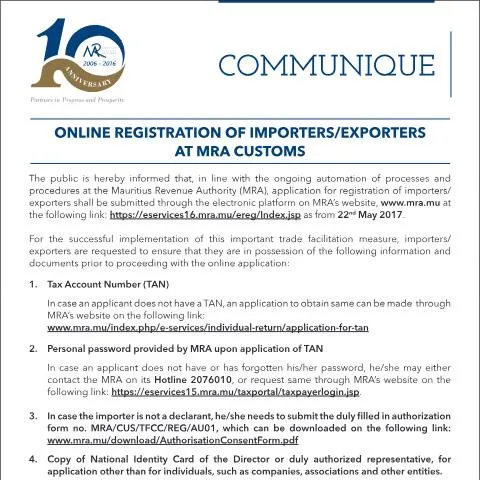
Introduction to the Online Registration Process for Importers and Exporters at MRA Customs
The Mauritius Revenue Authority (MRA) has announced a significant enhancement in its trade facilitation measures through the automation of its registration procedures for importers and exporters. Effective from 22 May 2017, this initiative aims to streamline the registration process by enabling applicants to complete their registration electronically via the official MRA website. This notice provides comprehensive guidance on the requirements, procedures, and key points to consider for successful online registration.
Scope and Purpose of the Notice
This notice is intended to inform all stakeholders involved in import and export activities in Mauritius about the new digital registration platform introduced by the MRA. It emphasizes the importance of adopting electronic procedures to foster efficiency, reduce processing times, and improve overall trade facilitation. The document outlines the necessary prerequisites, the steps involved in the online application, and the support available from the MRA to ensure a smooth transition to the digital registration system.
Who Is Affected by This New Procedure?
The online registration platform is applicable to:
- Importers and Exporters registered or intending to register with the MRA for customs clearance purposes.
- Legal representatives or authorized agents acting on behalf of corporate entities or associations involved in cross-border trade.
- New applicants who need to obtain a Tax Account Number (TAN) or update their registration details.
Individuals or entities that previously registered manually or through other means will be encouraged to transition to the electronic platform for future dealings.
Key Requirements for Online Registration
Applicants must ensure they possess the following information and documents before initiating their online registration:
- Tax Account Number (TAN): If not already obtained, applicants can apply for a TAN via the MRA e-services portal.
- Personal Password: Provided by the MRA upon TAN registration. If forgotten, it can be reset through the MRA website or by contacting the MRA Hotline.
- Authorization Form (if applicable): For entities other than individuals, a duly filled authorization form (form no. MRA/CUS/TFCC/REG/AU01) must be submitted. This form can be downloaded from the MRA website.
- Identification Document: A copy of the National Identity Card (NIC) of the director or authorized representative for companies, associations, or other legal entities.
Step-by-Step Procedure for Online Registration
Accessing the Platform
Applicants are advised to visit the MRA’s official e-services portal at https://eservices16.mra.mu/ereg/Index.jsp to commence their registration process.
Creating or Logging into the Account
Users must log in using their existing credentials, which include their NIC or TAN and password. If new users do not have an account, they should follow the instructions to register and obtain login details.
Completing the Application
Once logged in, applicants should follow the on-screen instructions to fill in the required information, upload necessary documents (such as the authorization form and NIC copy), and verify all details before submission.
Fill in your form directly online
No printing: type your details into the boxes of the official form, tick, then download the PDF ready to send.
- 1Type into the form boxes
- 2Tick in one click
- 3Save and download the PDF
Post-Submission Support
For any queries or technical assistance, applicants can contact the MRA Customs Department’s Registration Unit at 202 0500 (Ext 2202 or 2206) or via email at [email protected]. The MRA also provides an 'Instructions to Users' guideline accessible on the platform to facilitate the process.
Legal and Organizational References
This initiative aligns with the MRA’s broader strategy to digitize customs procedures and enhance compliance through modernized systems. The legal framework supporting this process includes the provisions of the Mauritius Revenue Authority Act and relevant customs regulations. The online registration platform forms part of the MRA’s commitment to transparency, efficiency, and compliance with national and international trade standards.
Conclusion
All importers and exporters are strongly encouraged to adopt the electronic registration process introduced by the Mauritius Revenue Authority. Transitioning to the digital platform not only expedites the registration process but also aligns with the government’s broader digital transformation objectives. Ensuring that all required documents and information are prepared in advance will facilitate a smooth registration experience and contribute to more efficient trade operations in Mauritius.