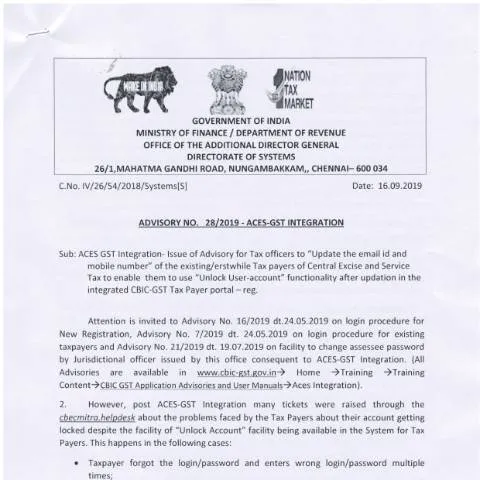
The Importance of Advisory 28 16092019 in GST Compliance
Every taxpayer in India must navigate the complexities of the Goods and Services Tax (GST) system. One of the pivotal documents in this journey is the Advisory 28 16092019, which focuses on updating email IDs and mobile numbers to unlock user accounts. This advisory aims to enhance the efficiency of tax compliance by facilitating better communication between taxpayers and the GST administration. Failure to keep your contact information updated can lead to complications in managing your tax responsibilities.
Understanding the Context of User Accounts in GST
To appreciate the role of Advisory 28 16092019, it is critical to grasp the broader framework of user accounts within the GST system. As a taxpayer, your ability to access your GST account is paramount. This account serves as the gateway to a plethora of services, including filing returns, checking refund status, and communicating with the tax authorities. If you forget your login credentials or your account is locked due to outdated contact information, it can significantly hinder your ability to meet your obligations.
The Trigger for Filing Advisory 28 16092019
Typically, a taxpayer might find themselves needing to file this advisory when they face a locked account condition. This situation often arises when the registered mobile number or email ID associated with the GST account is no longer accessible. Changes in personal contact information due to various reasons—such as moving to a new city, changing service providers, or even personal preferences—can lead to this scenario.
Step-by-Step Guide to Completing the Advisory 28 16092019
Filing this advisory requires careful attention to detail. It is essential to ensure that all information provided is current and accurate. The following steps outline the process for completing Advisory 28 16092019:
- Gather Necessary Information: Before starting, collect your GSTIN, the old and new email IDs, mobile numbers, and any relevant documents that may support your request.
- Access the Advisory Form: Navigate to the appropriate e-governance platform to download or access the advisory form pertaining to the update.
- Fill Out the Required Sections: Carefully input your information as follows:
- GSTIN: Ensure that your GST Identification Number is correctly entered.
- Old Contact Information: Provide the email ID and mobile number that are currently registered.
- New Contact Information: Enter the email ID and mobile number you wish to update.
- Review the Form: Double-check all entries for accuracy, as any discrepancies could delay processing.
- Submission: Once satisfied, submit the completed advisory through the designated platform or method.
After Submission: What Happens Next?
Once the advisory is submitted, the taxpayer must wait for the processing to be completed by the GST authorities. This can take varying amounts of time, depending on several factors including the volume of requests and the specific circumstances of your advisory. During this waiting period, it is advisable to monitor your registered email and mobile number for any communications from the GST department, as they may require further verification or information.
The Implications of Successful and Unsuccessful Updates
Should the updates be successfully processed, you will receive confirmation through your new contact information. This allows you to regain access to your GST account and continue fulfilling your tax obligations seamlessly. However, if there are issues with the processing—such as discrepancies in the information provided—you will need to amend your submission. It's crucial to respond promptly to any requests for additional information from the GST authorities to avoid further complications.
Common Challenges and Pitfalls in the Process
While the process may seem straightforward, there are common challenges that taxpayers encounter when filing Advisory 28 16092019. Awareness of these pitfalls can help mitigate the risk of delays or rejections:
- Incorrect GSTIN Entry: Always ensure your GSTIN is accurate; a single digit error can cause your request to be rejected.
- Discrepant Contact Information: Make sure that the old contact details provided match those previously registered with GST.
- Inadequate Documentation: If the authorities require supporting documents and they are not provided, this can lead to complications.
- Delayed Response from GST Authorities: Prepare for potential delays and remain proactive in following up if you do not receive feedback within a reasonable timeframe.
Addressing Refusals and Errors: Your Next Steps
In the unfortunate event that your advisory is refused, there are specific actions you can take to resolve the situation. Firstly, it is crucial to read the refusal notice carefully. This notice will typically outline the reasons for the rejection, which may pertain to incorrect information or documentation. Once you have identified the issue, you can take the following steps:
- Gather Additional Documentation: Depending on the reason for refusal, you may need to compile more documents to support your case.
- File a Correction: Using the same platform, file a new advisory with the corrected information and any additional documentation as necessary.
- Contact GST Helpdesk: If you are unsure of how to proceed, reaching out to the GST helpdesk can provide additional guidance.
Timeline for Updates and Expectations Post-Submission
Understanding the timeline associated with Advisory 28 16092019 is vital for effective planning. Generally, after submission, you can expect the following:
| Process Stage | Expected Duration | Notes |
|---|---|---|
| Submission to Acknowledgment | 1-3 business days | Confirmation will typically be sent to your registered email or mobile. |
| Processing Time | Varies (3-10 business days) | Depends on the volume of submissions. |
| Outcome Notification | 1-3 business days | You'll receive an update on whether the change was successful. |
Integration of Advisory 28 16092019 within the Broader GST Framework
Advisory 28 16092019 is not just a standalone document but is intricately woven into the fabric of the GST compliance framework. Ensuring accurate contact information is critical for several reasons:
- Efficient Communication: Timely updates allow for seamless communication between taxpayers and the GST department, which is essential for addressing queries and resolving issues swiftly.
- Security and Fraud Prevention: Keeping your contact information current helps protect against unauthorized access to your GST account.
- Enhanced Tax Compliance: By ensuring that you can receive notifications regarding your obligations, you remain compliant and avoid penalties.
Final Reminders for Taxpayers
In navigating through the Advisory 28 16092019 process, it is essential to remain diligent and proactive. Take the initiative to keep your contact information updated, monitor your GST account regularly, and respond swiftly to any notifications or requirements from the GST authorities. By doing so, you not only fulfill your obligations but also contribute to a more efficient tax system for all.
Understanding the Advisory for Unlocking User Accounts
The recent Advisory 28 16092019 provides crucial updates for taxpayers experiencing difficulties accessing their accounts. This advisory emphasizes the necessity of updating your email ID and mobile number as essential steps in unlocking your user account with the Central Board of Direct Taxes (CBDT). It is imperative to understand the process delineated by the CBDT to ensure a seamless rectification of any access issues.
The advisory outlines specific scenarios in which taxpayers may find themselves locked out of their accounts, such as after multiple unsuccessful login attempts. In these cases, updating your registered email ID and mobile number not only facilitates account recovery but also enhances security measures to protect your sensitive tax-related information.
To initiate the unlocking process, you will need to ensure that your current mobile number and email ID are linked to your PAN (Permanent Account Number). Should there be inconsistencies in these details, you must first rectify them through the proper channels, which could involve submitting Form 49A for PAN corrections or updating your Aadhaar information via UIDAI. Remember, having an updated Aadhaar is pivotal, as it is often required for e-verification and other services.
Steps to Update Your Contact Details for Account Recovery
Following the advisory, the process for updating your email ID and mobile number is straightforward but requires careful attention. First, ensure that you have your PAN on hand, as it will be necessary for any updates or corrections.
- Log into the Income Tax e-filing portal: Navigate to the official e-filing website. You may need to create an account if you do not already have one.
- Access the 'Profile' section: Once logged in, go to the 'Profile' section where you can find options related to your personal information, including your registered email ID and mobile number.
- Update your details: Enter your new email and mobile number in the respective fields. Ensure that both are active and accessible, as you will receive verification codes and alerts on these contacts.
- Save changes: After entering the new details, be sure to save the changes. A confirmation message will be sent to your registered email ID or mobile number.
- Verification: Follow the instructions received via email or SMS to complete the verification process. This is crucial for ensuring that the updates are successfully made.
- Follow-up: If you do not receive a confirmation within 24 hours, revisit the portal and check the status of your details. If issues persist, you may need to contact the Income Tax helpline.
It is advisable to carry out these updates as soon as possible, especially with tax deadlines approaching. Additionally, keeping your contact information updated will ensure you receive all necessary communications from the CBDT regarding your tax filings, notices, and other important updates.
Common Pitfalls and Troubleshooting Tips
While the process for unlocking your user account is straightforward, several common pitfalls can hinder your progress. Being aware of these issues can save you time and frustration.
- Incorrect Credentials: Ensure that you are entering the correct PAN and any associated details. Double-check for typographical errors, as even small mistakes can lead to access issues.
- Inactive or Wrong Mobile Number/Email ID: If your mobile number or email ID is inactive or incorrect, you will not receive the verification codes required for unlocking your account. Always use an email ID and phone number that are currently in use. If you suspect that you’ve provided wrong details, you will need to follow the process for correcting your PAN details as described earlier.
- Browser Compatibility: Sometimes, the issue may arise from using an unsupported web browser. Always use the latest version of popular browsers like Google Chrome or Mozilla Firefox to access the e-filing portal.
- Not Completing the Verification: After updating your email ID and mobile number, if you do not complete the verification process through the link or code sent to you, the changes will not reflect in the system. Ensure to follow through with any verification emails or SMS messages received promptly.
- Server Issues: At times, high traffic on the portal can lead to errors in the updating process. If you encounter such issues, wait a few hours and try again.
- Keep Records: Always keep a record of your previous email and phone details, along with dates of update requests. This can help in case of disputes or further complications.
If you experience difficulties beyond these common issues, do not hesitate to reach out to the CBDT's taxpayer support systems. They are available to assist you through the various contact options provided on their official website.