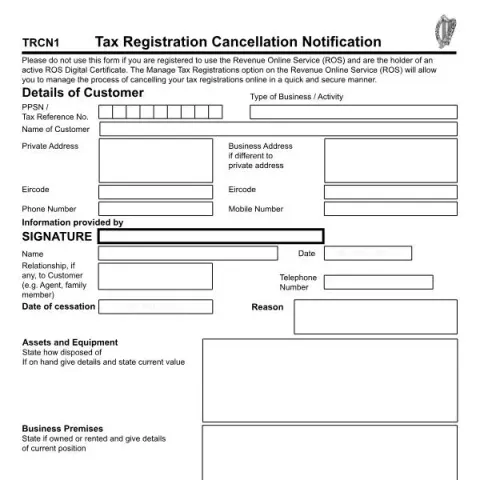
Understanding the Tax Registration Cancellation Notification TRCN1 in Ireland
The Tax Registration Cancellation Notification TRCN1 is an official form issued by the Office of the Revenue Commissioners in Ireland. It serves as a formal request to cancel existing tax registrations held by a business or individual. This document is essential for taxpayers who have ceased trading, disposed of assets, or no longer meet the criteria for their current tax registration status. Proper completion and submission of this form ensure compliance with Irish tax law and help prevent unnecessary future tax obligations.
Who Should Use the TRCN1 Form?
This form is primarily intended for businesses and individuals who wish to cancel specific tax registrations. Typical scenarios include:
- Business closure or cessation of trading activities
- Disposal of assets or equipment that impact tax registration status
- Change in circumstances that make the current registration unnecessary, such as ceasing to operate a VAT-registered business or ending employment-related tax registrations like PAYE/PRSI
If you are registered to use the Revenue Online Service (ROS) and hold an active digital certificate, you are encouraged to manage your cancellations online via the Manage Tax Registrations option on ROS, which provides a quicker and more secure process. In such cases, submitting the paper form TRCN1 is unnecessary.
How to Complete the TRCN1 Form
Filling out the TRCN1 requires careful attention to detail. The form requests specific information to identify the taxpayer and the scope of the cancellation:
- Details of Assets and Equipment: State how assets or equipment were disposed of, or if they remain on hand, provide details and their current value.
- Business Premises: Indicate whether the premises are owned or rented, along with relevant details of the current situation.
- Tax Type and Registration Numbers: Specify which taxes are being canceled, such as Income Tax, VAT (including intra-EU VAT), Corporation Tax, PAYE/PRSI, or other applicable taxes. Include the relevant registration numbers.
- Customer Details: Provide the PPSN or tax reference number, business or activity type, customer name, and addresses (private and business if different). Contact details such as phone numbers and Eircodes are also required.
- Reason for Cancellation: Clearly state the reason and the date of cessation (DD/MM/YYYY).
- Declaration: The form must be signed and dated by the person submitting it, often a director or authorized representative.
Additional Information and Supporting Documents
While the TRCN1 form primarily focuses on factual declarations, it is advisable to prepare any relevant documentation that supports your cancellation request. This may include proof of asset disposal, lease termination agreements, or other legal documents confirming the cessation of activities.
Ensure that all information provided is accurate to avoid delays or rejection of the cancellation request. Incomplete or incorrect forms are common sources of processing delays, so double-check all entries before submission.
Where and How to Submit the TRCN1 Form
The completed form should be submitted to the appropriate Revenue registration unit based on your category:
- For general business registrations: Send to the Business Registrations Office at P.O. Box 1, Wexford, or email to [email protected]. Contact: 01 738 3630.
- For large corporates and high-net-worth entities: Submit to the Large Corporates Division at Anne Street, Wexford, or email [email protected].
- For financial institutions and investment funds: Address to the High Wealth & Financial Services Division at the same Wexford address, or email [email protected].
If you are registered on ROS, manage your cancellations directly online, which is recommended for efficiency and security.
Fill in your form directly online
No printing: type your details into the boxes of the official form, tick, then download the PDF ready to send.
- 1Type into the form boxes
- 2Tick in one click
- 3Save and download the PDF
Common Errors to Avoid
To ensure a smooth cancellation process, be mindful of:
- Providing accurate and complete registration details
- Clearly stating the reason for cancellation and supporting documentation if required
- Using the correct address and contact details for your registration type
- Signing and dating the form appropriately
Conclusion
The TRCN1 form is a vital administrative tool for Irish taxpayers wishing to formally cancel their tax registrations. Proper understanding of its purpose, accurate completion, and timely submission help ensure compliance with Irish tax obligations and facilitate a smooth transition when ceasing business activities or updating registration statuses.