Understanding the "Request for Judgment or for Dismissal" Form (SCL 042) in British Columbia's Small Claims Court
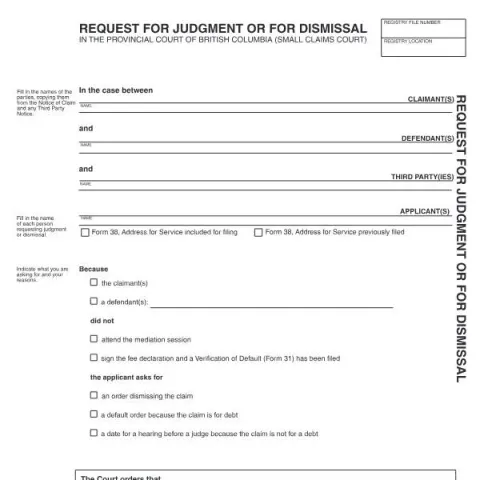
If you're involved in a small claims case in British Columbia and need to request a judgment or seek a dismissal of the claim, you'll likely use the official form titled "Request for Judgment or for Dismissal" (Form SCL 042). This form is an essential legal document that helps parties communicate with the court regarding the status of their case, especially when certain procedural steps have not been completed or when parties want the court to make a decision without a hearing.
Purpose and When to Use This Form
This form serves several purposes depending on the circumstances of your case:
- Requesting a Dismissal: If you believe the claim should be dismissed—for example, because the opposing party did not attend a scheduled mediation session or failed to comply with procedural requirements—you can file this form to ask the court to dismiss the claim.
- Asking for a Default Judgment: When the claim involves a debt and the opposing party has not responded or participated, this form can be used to request a default order.
- Scheduling a Hearing: If the claim is not for a debt and the parties want a judge to decide the case, this form can request a date for a hearing before a judge.
In essence, the form helps streamline the resolution process when procedural issues prevent the case from proceeding normally or when parties seek a court order based on the current status of the case.
How to Complete the Form
Identifying the Parties
Begin by filling in the names of the parties involved, exactly as they appear on the Notice of Claim and any Third Party Notice. This includes:
- Claimant(s): The person or entity bringing the claim.
- Defendant(s): The person or entity against whom the claim is made.
- Third Parties: Any other persons requesting judgment or dismissal on the case.
Providing Case Details
Include the Registry File Number and the Registry Location, which are essential for identifying the case. The date of filing by the registrar is also required to ensure the court accurately processes your request.
Specifying Your Request
Clearly state what you are asking the court to do:
- Request an order dismissing the claim.
- Ask for a default order because the claim involves a debt.
- Request a date for a hearing if the claim is not for a debt.
Additionally, provide your reasons for the request, such as non-attendance at mediation or procedural non-compliance.
Filing and Submission Procedures
This form can typically be filed in person at the courthouse or through the court’s digital filing platform, if available. Ensure you include the Address for Service previously filed or the appropriate contact details to facilitate communication with the court.
Once submitted, the court will process your request and may complete the order, dismiss the claim, or set a hearing date, depending on the circumstances and the information provided.
Fill in your form directly online
No printing: type your details into the boxes of the official form, tick, then download the PDF ready to send.
- 1Type into the form boxes
- 2Tick in one click
- 3Save and download the PDF
Follow-Up and Next Steps
After the court issues an order, it is important to follow any instructions provided, such as paying fees or attending scheduled hearings. If your request is granted, ensure you receive a copy of the court order for your records. If the court requires additional information or clarification, be prepared to provide it promptly.
Contacts and Additional Resources
For assistance with completing this form or understanding your rights and obligations, you can contact the registry office at the courthouse where your case is filed. The court staff can guide you through the filing process but cannot provide legal advice.
Remember, accurate and complete submissions help ensure your request is processed efficiently and that your case proceeds smoothly through the legal system.