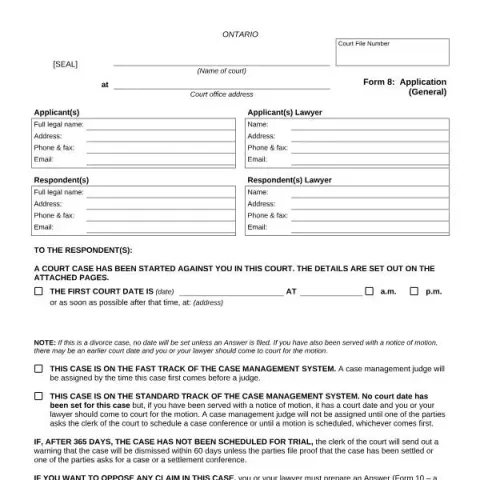
Understanding and Filling Out the Ontario Court Form 8: Application (General)
If you are involved in a family law case in Ontario, you may need to complete Form 8: Application (General). This official court form is used to initiate a legal application related to family matters, such as divorce, support, or property claims. Here, we will guide you through its purpose, eligibility, and step-by-step instructions for filling it out correctly.
Purpose and Typical Use Cases
Form 8 is designed for individuals (applicants) who want to start a family law case in Ontario courts. It serves as the initial document to outline your claim, whether it involves support, property, or custody issues. The form provides the court with essential details about the case, parties involved, and the nature of the claim.
This form is applicable in situations such as:
- Applying for divorce or separation
- Claiming child or spousal support
- Requesting exclusive possession of the matrimonial home
- Seeking property division
Eligibility and When to Use Form 8
You should use Form 8 if:
- You are initiating a family law proceeding in Ontario
- You are the applicant (the person starting the case)
- You need to provide the court with details about your case and parties involved
Note that if the case involves only child support payments at the guideline amount, you may not need to fill out a Financial Statement. However, for claims involving property or support beyond the basic amount, completing the appropriate financial forms is mandatory.
Step-by-Step Guide to Filling Out Form 8
1. Start with Court Details
Enter the court file number once assigned, the Name of the court, its location, and the address of the court office. These details are usually provided by the court clerk or your lawyer.
2. Complete Applicant and Respondent Information
Provide full legal names, addresses, phone numbers, and email addresses for both the applicant and respondent. If either party has legal representation, include their lawyer’s contact details as well.
3. Notify the Respondent
The form includes a notice to the respondent that a case has been started against them, with details about the first court date and location. It also explains the importance of filing an answer within the specified timeframe.
4. Indicate the Type of Claim
Check the box that applies to your case:
- Claim for support only
- Claim for property or exclusive possession of the matrimonial home
- Both support and property claims
Depending on your choice, you will need to complete additional financial forms (Form 13 or Form 13.1) and serve them on the other party.
5. Fill in Family and Relationship Details
Provide the ages, birthdates, residence locations, and marital history of both applicant and respondent. Include details about previous divorces, if applicable, and the history of your relationship (marriage date, separation date, etc.).
6. List Children Involved
Include all children related to the case, even if no claim is made for them. Provide their full names, ages, birthdates, current residence, and who they are living with.
Fill in your form directly online
No printing: type your details into the boxes of the official form, tick, then download the PDF ready to send.
- 1Type into the form boxes
- 2Tick in one click
- 3Save and download the PDF
7. Previous Cases or Agreements
Indicate whether there have been prior court cases involving the parties or if there are existing written agreements related to the current matter. Include dates and details where relevant.
After Completing the Form
Once filled out, you can submit Form 8 in person at the courthouse or electronically via the official Ontario Family Law e-Filing platform at www.ontario.ca/familyclaims. It is highly recommended to seek legal advice before filing to ensure all information is accurate and complete.
Remember that the court will assign a case management judge, and subsequent steps may involve serving the form on the respondent, filing financial statements, and scheduling hearings. Be mindful of deadlines, especially the 30-day window for the respondent to file an answer after being served.
Final Tips
- Ensure all information is accurate and complete to avoid delays.
- Keep copies of all documents served and filed.
- Consult a family lawyer or Legal Aid Ontario if you need assistance with the process.
Filing the correct application form is a crucial step toward resolving family law matters in Ontario. By carefully following these instructions, you can ensure your case is properly initiated and proceed smoothly through the legal process.