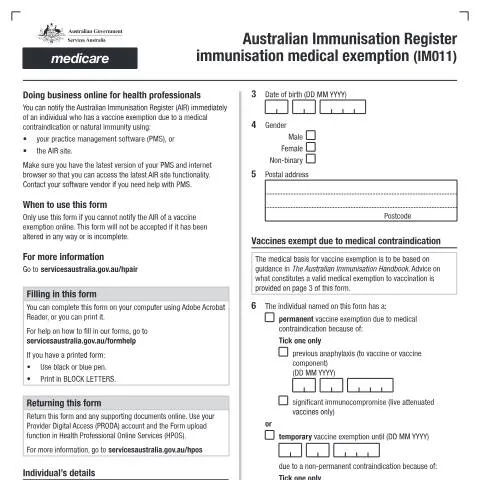
Navigating the Australian Immunisation Register: A Deep Dive into Form IM011
Understanding the nuances of the Australian Immunisation Register (AIR) is essential for health professionals and individuals needing to secure a medical exemption for vaccinations. The IM011 form plays a pivotal role in this process. If you've found yourself in a situation where you need to file a medical exemption, comprehending the intricacies of this document is crucial for a seamless experience.
When Medical Exemptions Become Necessary
Medical exemptions from vaccinations are often required for individuals with certain health conditions or concerns. Factors that may necessitate the completion of the IM011 form include:
- Severe allergic reactions to vaccine components.
- Underlying health conditions that contraindicate vaccination.
- Previous adverse events following vaccination that warrant caution.
These circumstances highlight the importance of this form, as it is a formal means to document and communicate specific medical needs. Ensuring that the requisite details are accurately conveyed not only protects the individual's health but also aligns with regulatory requirements set forth by health authorities.
Who Is Responsible for Submitting the IM011?
Typically, the responsibility for completing and submitting the IM011 form lies with health professionals—more specifically, those who administer vaccinations. This can include general practitioners, specialists, or immunisation nurses. However, individuals can also be involved in this process, especially if they are seeking to understand their rights regarding vaccination exemptions.
Understanding Your Role
For health professionals, the obligation includes:
- Accurately evaluating the patient's medical history.
- Determining if a medical exemption is warranted based on established guidelines.
- Completing the form with all necessary details to avoid delays in processing.
Patients play a supportive role by ensuring they disclose all pertinent information related to their health, thus aiding the practitioner in making an informed decision.
Filling Out the IM011 Form: Key Components to Include
Completing the IM011 form accurately is paramount. Here’s a breakdown of the main sections you will encounter:
- Patient Details: Include the individual's full name, date of birth, and contact information. It is critical to ensure this information is current and correct.
- Medical History: Document any relevant medical conditions or allergies. This section often requires detailed explanations to substantiate the claim for an exemption.
- Healthcare Provider Information: The form must be filled out by a registered healthcare provider, whose details and registration number must be included.
- Signature: The healthcare provider must sign and date the form, confirming the information provided is accurate and reflecting their professional judgement.
Tips for Accurate Completion
- Review the completed form with the healthcare provider before submission.
- Ensure that all necessary documentation supporting the medical exemption is attached.
- Use clear and legible handwriting if submitting a paper form.
Submission Pathways: How to Submit Your IM011 Form
Once the IM011 form is completed, the next step is submission. The following pathways are available:
- Online Submission: Health professionals can upload the completed form through the myGov platform linked with Services Australia.
- Paper Submission: It is also possible to send the form via post to the relevant Services Australia department. Ensure to check the most current mailing address as it may change.
- In-Person Submission: Although less common, submitting the form in person at a local Services Australia office is an option that some may prefer.
Choosing the Right Submission Method
| Submission Method | Pros | Cons |
|---|---|---|
| Online | Quick processing, instant confirmation | Requires access to myGov account |
| Paper | Traditional method, no tech needed | Longer processing time, potential postal delays |
| In-Person | Direct assistance available | Limited office hours, potential wait times |
After Submission: What to Expect
Following the submission of your IM011 form, it’s natural to want to know what happens next. The processing timeline can vary significantly based on several factors including workload and complexity of the exemption request. Here’s what generally occurs:
- Initial Review: Services Australia will conduct an initial assessment of the form to ensure all necessary information has been provided.
- Medical Validation: The details submitted will be evaluated against medical guidelines to determine the validity of the exemption.
- Notification: Once a decision is made, the relevant parties will be notified. This may include the healthcare provider and the individual concerned.
Keeping Track of Your Submission
For those who submit the IM011 form, being proactive is key. Here are some ways to monitor the status of your exemption request:
- Regularly check your myGov account for any updates or requests for additional information from Services Australia.
- If you opted for paper submission, consider following up with a phone call or visit to the local Services Australia office.
- Maintain a record of any correspondence or confirmation receipts related to your submission.
Unique Situations: Special Considerations for Submitting the IM011
There are instances where the process of submitting the IM011 form may require special consideration. Here are a few scenarios that can complicate the submission:
For Minors
If the exemption request is for a minor, the form must be completed by a parent or legal guardian. The healthcare provider may also need to consult with the guardian to ensure that all medical information is accurately reported.
For Temporary Residents
Temporary residents in Australia might need to consider additional documentation to support their exemption request. This can include proof of their immigration status and any relevant medical history that aligns with their circumstances.
In Cases of Urgency
Should an urgent need for a medical exemption arise—such as in preparation for an upcoming travel or event—applicants may need to communicate this urgency directly to their healthcare provider, who can then expedite the submission process where feasible.
Understanding the Consequences of Non-Submission
Failing to submit the IM011 form in a timely manner can have significant implications. Consider the following:
- Vaccination Requirements: Without an approved exemption, individuals may be required to undergo vaccination, which could exacerbate existing health concerns.
- Access to Services: Some services or school enrolments may hinge on vaccination status, potentially limiting opportunities for those without an exemption.
- Legal Responsibilities: Health professionals must ensure compliance with health regulations, including proper documentation of exemptions to avoid any legal repercussions.
Best Practices to Avoid Delays
To ensure a smooth submission process and mitigate risks associated with non-submission, consider the following strategies:
- Start the process early to accommodate any unforeseen delays.
- Engage in open communication with healthcare providers about any concerns or additional documentation that may be required.
- Stay informed on the latest health regulations and guidelines regarding vaccination exemptions, as these can change.
Understanding the Australian Immunisation Register (AIR)
The Australian Immunisation Register (AIR) is a comprehensive national database that records vaccinations administered to individuals in Australia. This system is essential for tracking immunisation status, ensuring public health safety, and facilitating vaccination programs across the country. The AIR covers vaccines given to all Australians, including children, adolescents, and adults, and it operates under the auspices of the Department of Health.
One of the key features of the AIR is its ability to streamline vaccination records for healthcare providers and patients alike. When an individual receives a vaccination, the details are reported to the AIR, enabling a centralized record that can be easily accessed by medical professionals. This is particularly useful for parents seeking vaccination history for their children, enabling them to meet school enrolment requirements or travel mandates.
Moreover, the AIR also plays a crucial role in the tracking of vaccine-preventable diseases, thereby informing public health responses and vaccination campaigns. The data collected can help identify immunisation coverage gaps in specific populations, allowing health authorities to target interventions effectively.
It's also important to note that individuals are entitled to access their immunisation records through the AIR. This access can be obtained via myGov, where users can link their Medicare account to view their vaccination history. Importantly, understanding one’s immunisation record is critical, especially in light of the COVID-19 pandemic, where proof of vaccination has become essential for international travel and certain employment sectors.
Medical Exemptions: Navigating the Immunisation Medical Exemption Form (IM011)
In Australia, while vaccination is highly encouraged and often mandated for various age groups and circumstances, there are instances where individuals may be eligible for medical exemptions. The Immunisation Medical Exemption Form (IM011) is the official document used to certify that an individual is exempt from receiving certain vaccinations due to medical reasons. Understanding how to navigate the IM011 form is crucial for those who require exemptions, particularly for school enrolment or employment purposes.
The IM011 form must be filled out by a registered medical practitioner who must certify that the individual has a medical contraindication to vaccination. Examples of medical exemptions may include severe allergic reactions to a vaccine component, certain immune deficiencies, or other significant health issues which may pose risks when vaccinated.
It is vital for applicants to ensure that the form is completed accurately and fully. Incomplete or incorrectly filled forms can lead to delays or denials in the exemption process, affecting a child's ability to attend school or participate in mandated vaccination programs. The completed IM011 form must then be submitted to the relevant authority, such as the school or employer, who will verify the exemption with the AIR to confirm the individual's vaccination status.
Moreover, it's important to be aware that medical exemptions are reviewed regularly. The Department of Health maintains stringent guidelines that ensure only individuals with valid and substantiated medical reasons are granted exemptions. This is to safeguard public health and maintain high immunisation rates across the population, which is particularly important in the context of herd immunity.
Updating Your Immunisation Status: A Step-by-Step Guide
Keeping your immunisation records up to date is crucial not just for personal health, but for public health safety as well. An accurate immunisation status can affect your eligibility for various programs, school enrolments, and even employment. The following steps outline how you can ensure that your immunisation status in the AIR is current and accurate.
Gather Your Documentation: Before you start the process, collect all relevant documentation. This includes vaccination records from your healthcare provider, any medical exemption forms, and identification documents such as your Medicare card or other identification proof.
Access Your myGov Account: To update your immunisation records, you will need a myGov account linked to your Medicare. If you do not have a myGov account, you can easily create one on the myGov website. Ensure that your Medicare account is linked, as this is essential for accessing the AIR.
Check Your Current Immunisation Records: Once logged into your myGov account, navigate to the Medicare section. Here, you can view your vaccination history as recorded in the AIR. It is important to carefully check this information for accuracy.
Report Any Changes: If you find discrepancies in your immunisation records, or if you have received new vaccinations that are not reflected, you should report these changes. This can be done by contacting Services Australia directly. They can guide you through the process of updating your records correctly.
Submit New Vaccination Records: If you've received vaccinations from a healthcare provider who isn’t automatically reporting to the AIR, you may need to submit the vaccination record directly. This can involve filling out a specific form and providing proof of vaccination, which your healthcare provider can assist with.
Confirm Updates: After submitting any new information, it’s vital to follow up to ensure that your immunisation status has been updated in the AIR. You can do this by logging back into your myGov account after a few weeks to check for changes.
Stay Informed: Finally, it's important to stay informed about immunisation programs and updates from the Department of Health. This includes understanding new vaccine rollouts or changes to existing vaccination policies, which may impact your personal or family health decisions.
By diligently managing your immunisation records and ensuring they are accurately reflected in the AIR, you not only safeguard your health but also contribute to the broader public health initiative aimed at reducing vaccine-preventable diseases in Australia.