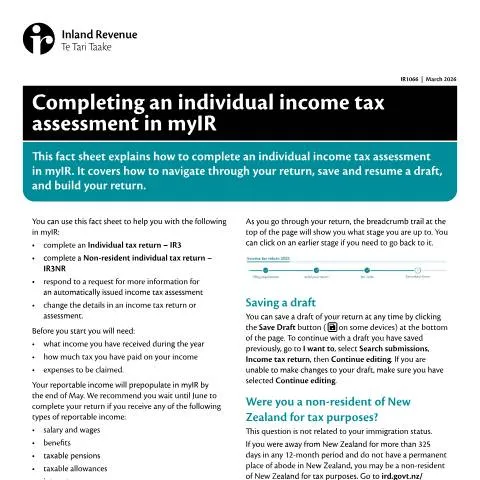
Understanding the IR1066 Form: A Critical Step in Your Tax Journey
When the end of the financial year approaches in New Zealand, many individuals find themselves preparing to navigate the intricacies of their income tax assessment. The IR1066 form plays a pivotal role in this process, specifically tailored for completing an individual income tax assessment using the myIR platform provided by the Inland Revenue Department (IRD). Understanding the nuances of this document is crucial for ensuring compliance and maximising potential entitlements. As you prepare to fill out this form, there are several aspects you'll need to consider.
Who Should Complete the IR1066 Form?
This form is primarily intended for individuals who are filing their income tax return, which includes a variety of income types ranging from salaries and wages to investment earnings. The eligibility to complete the IR1066 form includes:
- New Zealand residents who have earned income during the financial year.
- Non-residents who have New Zealand-sourced income, needing to file an IR3NR return.
- Individuals who have undergone significant life changes, such as starting a business or changes in residency status.
It's worth noting that not every individual will need to complete this form. For example, if your total income was below the taxable threshold, you might be exempt from filing.
The Context of the IR1066 Form: Regulation and Compliance
The IR1066 form is grounded in the Tax Administration Act 1994 and various other legislative frameworks that govern taxation in New Zealand. The framework requires all eligible taxpayers to report their income accurately. Failing to do so could lead to penalties or increased scrutiny from the IRD. Moreover, the Official Information Act 1982 provides guidelines on the transparency and accessibility of government information, ensuring that individuals have the right to understand their obligations.
Critical Steps Before Completing the IR1066 Form
Before diving into the details of the IR1066, it’s essential to prepare adequately. Here’s what you should gather:
- Income Details: Compile all records of your income for the financial year, including salary, wages, dividends, and any other sources of income.
- Tax Payments: Keep track of how much tax has been deducted from your earnings. This is vital for ensuring your tax return is accurate.
- Expense Records: Make sure you have a detailed list of any expenses you plan to claim, as these can significantly affect your taxable income.
By preparing these documents ahead of time, you streamline the process and reduce the likelihood of errors.
Navigating the myIR Platform: Your Gateway to Completing the IR1066
The myIR online platform is designed to facilitate the tax return process. To start your IR1066, navigate to the income tax section of myIR. Here's a general workflow:
- Accessing myIR: Log in to your myIR account. If you're a first-time user, you may need to create an account and verify your identity using RealMe.
- Choosing the Right Form: Once logged in, select the option to complete an individual tax return and ensure you're choosing the correct form (IR3 or IR3NR if applicable).
- Building Your Return: You'll be prompted to tick boxes for different types of income you received. Be vigilant here; if a box is ticked in error, it may lead to complications.
The myIR interface is user-friendly, featuring a breadcrumb trail to help you track where you are in the process, with Save Draft options available for later completion.
Decoding the IR1066: Key Sections Explained
The IR1066 form consists of various sections, each covering specific aspects of your income and deductions. Let's break down these sections and highlight what you need to pay attention to:
| Section | Description | Common Pitfalls |
|---|---|---|
| Income Types | Select all applicable income types you received during the year. | Leaving a box ticked for income you did not receive, leading to incorrect assessments. |
| Business Industry Classification (BIC) | Enter the code relevant to your business activities. | Incorrect codes may result in misclassification for ACC purposes. |
| Secondary Forms | Indicate if you have additional forms, such as rental income. | Failing to attach these forms can lead to delayed processing. |
| Specific Situations | Mark any conditions that apply to your income situation. | Not disclosing specific situations might raise flags with the IRD. |
| Disclosure Requirements | Any additional disclosures needed for your return. | Missing required disclosures can lead to compliance issues. |
The Consequences of Your Submission: What Happens Next?
After submitting your IR1066 form, several outcomes can follow. The IRD will process your return, and you might receive:
- A Tax Assessment: This is a notification detailing your tax obligations, including any liabilities or refunds.
- Requests for Further Information: If any details are unclear or missing, the IRD might reach out for clarification.
- Penalties for Late Submission: Ensure your return is submitted on time to avoid late fees or penalties.
If a mistake is found in your return after submission, you can amend it through myIR, but timely action is crucial. Corrections should ideally be made within a specific timeframe to avoid complications.
Dealing with Errors: Addressing Common Challenges
Despite careful preparation, errors can occur. Here’s how to navigate these challenges:
- Identifying Errors: Regularly review your submitted return and the IRD’s assessment for discrepancies.
- Making Amendments: Use myIR to submit an amended return if you discover errors after submission.
- Responding to Requests: If you receive a request for more information from the IRD, respond promptly and provide the necessary documentation.
Understanding Your Obligations and Rights
Completing the IR1066 form isn’t merely a bureaucratic task; it has real consequences for your financial standing. Meeting your obligations is vital, as it ensures you remain compliant with New Zealand tax laws. Here are some key responsibilities:
- Accurate Reporting: Ensure all income is accurately reported to avoid ramifications.
- Timely Submissions: Submit your return by the designated deadline to avoid potential penalties.
- Maintain Records: Keep thorough records of your income and any claimed expenses for a minimum of seven years, as the IRD may request these during audits.
On the flip side, you have rights too. If you're facing difficulties understanding your obligations, the IRD provides resources and support to help taxpayers comprehend their responsibilities.
Final Thoughts on Completing the IR1066 Form
As you prepare to complete the IR1066 form, remember that diligence and attention to detail are key. The process may appear daunting, but with the right preparation and understanding, you can navigate it successfully. Each step, from gathering your documentation to submitting the online form, plays a crucial role in ensuring your compliance with New Zealand's tax laws. Take the time to understand the requirements, and don't hesitate to seek assistance if needed — the consequences of overlooking this vital task can be significant.
Understanding Tax Residency in New Zealand
Before diving into the process of completing your individual income tax assessment in myIR, it’s essential to understand the concept of tax residency in New Zealand. Your residency status significantly influences how your income is taxed.
In New Zealand, you are considered a tax resident if you meet one of the following criteria:
- You have a permanent place of abode in New Zealand.
- You have been in New Zealand for more than 183 days in any 12-month period.
If you qualify as a tax resident, you will be taxed on your worldwide income. Conversely, non-residents are taxed only on their New Zealand-sourced income. It is crucial to accurately establish your residency status as it can affect your tax obligations and potential entitlements, including the ability to claim tax credits or deductions on foreign income.
For further clarification, check the Inland Revenue Department (IRD) website, where you can find detailed guidelines on residency rules and resources for specific scenarios, such as international students or temporary visa holders.
Utilizing myIR for Efficient Tax Management
myIR is designed to streamline your tax management experience in New Zealand. By registering for myIR, you gain access to various online services that allow for a more efficient engagement with your tax obligations.
Once logged in, you can view your current tax position. Take advantage of the dashboard, which provides an overview of your income tax assessments, any outstanding payments, and important deadlines. This feature ensures that you remain informed about your tax situation and can plan accordingly.
Moreover, myIR facilitates the submission of supplementary information when completing your tax assessment. If you receive income from multiple sources (such as freelance work or investments), you can input each income stream separately, making it easier for the IRD to process your return accurately. Keep in mind that you can also adjust your details if your circumstances change during the tax year, such as receiving a new job or changing your residency status.
For new users, setting up myIR includes obtaining a RealMe digital ID, which enhances your security and ensures that your personal information is protected. For guidance on setting up this digital identification, refer to the RealMe website.
Common Mistakes to Avoid When Filing Your Tax Assessment
Filing your individual income tax assessment can be straightforward if you stay attentive to details and avoid common pitfalls. Here are some mistakes to watch out for:
- Incorrect Income Reporting: Ensure that all income streams are reported, including secondary jobs, freelance work, and any investment income. The IRD has access to various data sources, and discrepancies can lead to complications.
- Neglecting Deductions and Credits: Familiarize yourself with allowable deductions, such as those for business expenses or donations to registered charities. Failing to claim eligible deductions can result in paying more tax than necessary.
- Missing Deadlines: Keep track of important tax deadlines, including those for provisional tax if applicable. Late submissions may incur penalties or interest on unpaid tax.
- Incorrect Personal Information: Verify that your contact details and bank account information are up to date to prevent issues with communication or refunds.
By proactively addressing these common mistakes, you can make the filing process smoother and mitigate the risk of receiving inquiries or audits from the IRD. If you find yourself confused or uncertain, consider consulting with a tax advisor who can provide tailored advice based on your particular situation.