Navigating the Complexity of Child Support: Understanding Form IR129 2023
Imagine being a single parent struggling to make ends meet while ensuring your child's needs are met. In New Zealand, the government has put various support structures in place to alleviate some of these burdens, one of which is the Child Support program administered by the Inland Revenue Department (IRD). Within this framework, the IR129 2023 form emerges as a pivotal document for those wishing to opt out of the collection of child support payments. Let’s delve into the intricacies of this form, its purpose, and the procedures surrounding its completion and submission.
The Regulatory Landscape Behind Child Support
The Child Support system in New Zealand is governed by a complex set of laws and regulations designed to ensure that both parents contribute to the financial needs of their children. The framework is primarily based on the Child Support Act 1991, which outlines the responsibilities of parents regarding financial contributions.
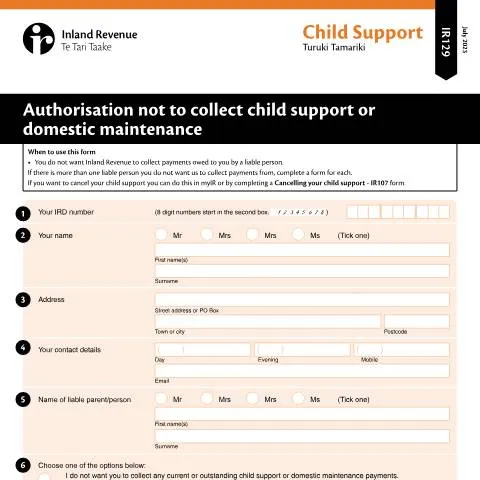
Form IR129 serves a specific purpose within this legislative framework. It's intended for individuals who no longer wish for the IRD to collect child support payments on their behalf. The possibility of opting out is significant as it allows parents to maintain control over their financial arrangements regarding child support.
Deciphering the Purpose of Form IR129 2023
Form IR129 is not merely a bureaucratic hurdle; it plays a crucial role in providing parents with options to manage their financial responsibilities. When a parent chooses to fill out the IR129, they are essentially declaring that they do not want the IRD to collect any current or outstanding child support or domestic maintenance payments from the liable parent. This decision can stem from various personal circumstances, including changes in financial status, arrangements made directly between parents, or even the decision to pursue collection through legal channels like the District Court.
Who Should Submit Form IR129?
This form is specifically designed for the recipient of child support payments—the custodial parent—who is opting out of governmental collection. It’s crucial to understand that if multiple liable parents are involved, a separate form must be completed for each one. Additionally, those who wish to cancel their child support altogether must use another specific form, the IR107, or manage their cancellation through myIR, the digital portal for the IRD.
Completing Form IR129: A Step-by-Step Guide
Completing Form IR129 requires careful attention to detail to avoid potential pitfalls. Below is a breakdown of the critical sections of the form and tips on how to navigate them effectively.
Section Breakdown of Form IR129
- Personal Information:
- Your IRD Number: Ensure that your IRD number is correct. It’s an 8-digit number that starts in the second box. This number is vital as it identifies you within the system.
- Your Name: Fill in your title (Mr, Mrs, Ms) and provide your first name and surname.
- Address: Include your street address or PO Box, town or city, and postcode. Double-check for accuracy.
- Contact Details: Provide day, evening, and mobile phone numbers, along with your email address for any follow-up communications.
- Information on the Liable Parent:
- Document the name of the liable parent, including their title, first name, and surname. This information is crucial as it identifies who is responsible for making the payments.
- Payment Options:
- Here, you must choose between two options: either you do not want the IRD to collect any payments, or you want to specify the payments you wish to continue collecting. This choice is essential as it dictates the future handling of payments.
- If you choose to have payments collected, you need to specify the amount or the specific period for collection in Question 7.
- Declaration:
- Sign and date the form, understanding that once you opt out, you cannot later request the IRD to collect those payments again. This finality is a crucial consideration for parents.
Submitting Form IR129: The Next Steps
After meticulously completing the form, the next action is submission. It’s important to send the completed form to the designated address:
Child Support, PO Box 39010, Wellington Mail Centre, Lower Hutt 5045Once submitted, you may find yourself wondering how to track the progress of your application or what happens next. Here’s how the IRD processes the information:
Monitoring Your Application Status
- The IRD typically acknowledges receipt of the form and processes it within a certain period. However, it’s advisable to keep your lines of communication open. You can reach out to the Child Support department for any inquiries regarding your submission.
- If your circumstances change, or if you have any concerns post-submission, you are encouraged to follow up directly with the IRD for any necessary adjustments.
Understanding Who is Impacted by Child Support Arrangements
The implications of the Child Support system extend beyond the immediate custodial parent. Understanding the various profiles of individuals involved can clarify different situations surrounding Form IR129.
Profiles and Scenarios
- Single Parents: Often the most directly impacted, single parents may find themselves in situations where they rely heavily on child support for their financial wellbeing.
- Liable Parents: These are the non-custodial parents who are mandated to contribute financially. Their right to contest collection methods can lead to complex matters that require clarity on responsibilities.
- Multiple Liable Parents: In cases where more than one parent is liable for child support, navigating payments can become convoluted, necessitating individual forms to be filled out for each parent.
- Those Seeking to Alter Arrangements: Individuals who have previously relied on government collection but have moved into a better financial position may opt out to take control of collection directly with the liable parent.
Practical Timeline: When and How Long?
Understanding the timeline surrounding child support payments and the form submission process is crucial for effective management. Here’s a timeline outlining key phases:
| Event | Date Range | Action |
|---|---|---|
| Filing Form IR129 | Anytime | Submit via post to establish your preference regarding collection. |
| Processing of Form IR129 | Usually within 10 Business Days | Monitor for confirmation of your request. |
| Post-submission Changes | Ongoing | Contact the IRD for adjustments or inquiries. |
Distinguishing IR129 from Other Child Support Forms
Form IR129 is often confused with other child support forms, but it has a distinct role that is critical to understand. Here’s how it stands apart:
- IR107 - Cancelling Child Support: While IR129 allows you to opt-out of collection, IR107 is necessary for complete cancellation of child support obligations.
- Collection Requests: Other forms may address specific requests for payment collection, while IR129 is primarily focused on the cessation of collection duties by the IRD.
- Liable Parent Information Requests: Forms requesting information about liable parents or disputing payment amounts are separate from IR129, which is an affirmative declaration of choice regarding payment collection.
The landscape of child support in New Zealand is complex, and understanding forms like IR129 is essential for parents navigating these waters. The options available through the IRD provide necessary relief and flexibility, but they require careful consideration and accurate completion to ensure compliance and meet the needs of your family.
Understanding the IR129 Form: Purpose and Requirements
The IR129 form is a crucial document for individuals and businesses in New Zealand who are looking to claim their tax refunds, particularly for those eligible for the tax credits provided by the New Zealand government. This form is typically utilized by individuals who have had taxes withheld from their earnings, and they believe they have overpaid during the fiscal year. The IRD (Inland Revenue Department) is responsible for processing these claims, ensuring that taxpayers receive any refunds they are entitled to.
To complete the IR129 form, you will need to gather specific documentation, including your IRD number, details of your income, and any records of tax deductions. It’s imperative to double-check the accuracy of the information provided on the form to avoid delays in processing. The IR129 allows claimants to request refunds for various reasons such as excessive PAYE (Pay As You Earn) deductions or if you qualify for tax credits like the Working for Families Tax Credits.
Eligibility criteria may vary based on your residency status, income level, and the nature of your employment. For instance, non-residents may have different considerations when filling out the IR129, particularly if they are only temporarily working in New Zealand. Understanding these nuances is vital to ensuring your claims are processed smoothly and efficiently.
Filing the IR129 Form: Step-by-Step Guide
Filing the IR129 form can be a streamlined process if you approach it methodically. Here’s a step-by-step guide to help you navigate through it:
- Gather Your Information: Before you begin, collect all necessary documents, such as your payslips, tax statements, and IRD number. Ensure that all figures are accurate and up-to-date.
- Complete the Form: Access the form through the IRD's website. Fill it out carefully, ensuring that you provide all required information. Pay close attention to sections that pertain to your specific circumstances, whether you are an employee, self-employed, or a business owner.
- Review and Double Check: Mistakes can lead to processing delays. Review your completed form thoroughly and cross-check with your gathered documents.
- Submit Your Claim: You can submit your IR129 form electronically through the IRD’s online portal. Create or log into your RealMe account, and follow the instructions for submission. If you opt for paper submission, ensure that your documents are sent to the correct address as indicated on the form.
- Track Your Claim: After submission, you can track the status of your claim by logging into your IRD account. It's essential to keep an eye on updates, as the IRD may reach out for further information or clarification.
Common Mistakes to Avoid When Filing the IR129
While the IR129 form is designed to be user-friendly, there are several common pitfalls that individuals and businesses may encounter. Being aware of these can save you time and frustration:
- Incomplete Information: Omitting essential details can lead to rejection or delays in processing. Always ensure all required fields are filled out in their entirety.
- Incorrect IRD Number: Providing an incorrect IRD number can result in significant delays. Verify your IRD number before submitting the form.
- Missing Documentation: Supporting documents are crucial for your claim. Ensure that all necessary documents are attached or uploaded as required to substantiate your claim.
- Ignoring Deadlines: Be mindful of submission deadlines to avoid missing out on potential refunds. Familiarize yourself with the tax timeline for the fiscal year, which runs from 1 July to 30 June.
- Not Seeking Help When Needed: If you're unsure about any aspect of the IR129, don't hesitate to reach out for assistance. The IRD provides resources and can answer questions regarding the form to ensure you proceed correctly.