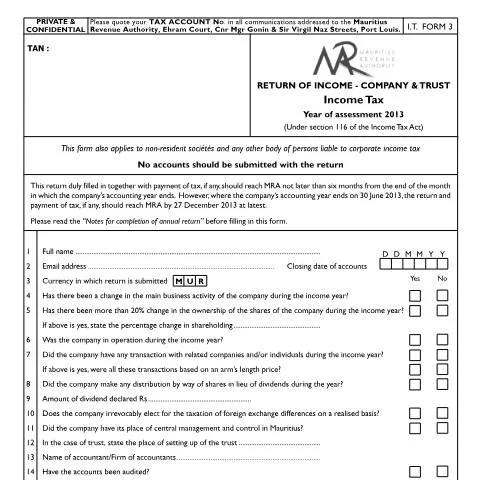
As a key component in the regulatory framework governing corporate taxation in Mauritius, the Company and Trust Income Tax Form (CompanynTrustForm2013IT3) serves a pivotal role for entities operating within the jurisdiction. This specific form is tailored for both resident and non-resident companies, as well as trusts that are liable to corporate income tax in Mauritius. The completion and submission of this document is not merely a bureaucratic requirement; it is an essential part of maintaining compliance with the Mauritius Revenue Authority (MRA) regulations.
While the form applies broadly, it is particularly critical for:
- Resident companies operating in Mauritius.
- Non-resident companies conducting business or generating income from Mauritius.
- Trusts established under Mauritian law.
All entities must ensure they meet the regulatory requirements pertaining to income tax filings, including the need to submit this form annually, irrespective of whether they have generated income during the assessment period.
Submission Channels: Navigating Your Options
The submission of the Company and Trust Income Tax Form can be completed through multiple channels, each with its own nuances:
1. Online Submission
The MRA encourages the use of digital platforms to streamline the filing process. By using the government’s e-filing system accessible via govmu.org, users can enjoy the following benefits:
- Instant confirmation of submission.
- Easy access to prior submissions for reference.
- Reduced processing time.
2. Paper Submission
Should you prefer traditional methods, the form can be filed in hard copy. This involves printing the completed form and delivering it in person or mailing it to:
Mauritius Revenue Authority
Ehram Court, Cnr Mgr Gonin & Sir Virgil Naz Streets, Port Louis.
Keep in mind that paper submissions could result in longer processing times, and confirmation of receipt may not be immediate.
3. Submission via a Third-Party Representative
Entities may also choose to authorize a tax consultant or an accountant to file on their behalf. In such cases, a letter of authorization must accompany the form, detailing the scope of the representative's authority.
Filing Deadlines: Key Dates You Shouldn't Miss
The timing of your filing is critical. The return must reach the MRA no later than six months from the end of the month in which the company’s accounting year concludes. For instance, if your accounting year ends on 30 June 2013, the return and any applicable tax payments must be submitted by 27 December 2013.
Filling out the CompanynTrustForm2013IT3 requires meticulous attention to detail. Let's decode the form section by section.
Section Overview
| Field |
Description |
Common Pitfalls |
| Full Name |
Enter the full legal name of the entity. |
Ensure the name matches exactly with the registered entity. |
| Email Address |
Provide a valid email for communication. |
Double-check for typos to avoid missing important updates. |
| Closing Date of Accounts |
Indicate the date your accounting period ends. |
Incorrect dates can lead to penalties. |
| Change in Business Activity |
Report any changes in principal business activities. |
Failure to disclose can trigger audits. |
| Ownership Change |
State if there was a change in share ownership. |
Provide accurate percentages or face non-compliance issues. |
Income Reporting and Deductions
Substantial accuracy is paramount when declaring income and deductions. The income section includes various sources such as:
- Turnover or Gross amount receivable
- Dividends, interest, and rental income
- Other incomes such as profit from asset disposals
Each deduction must be documented thoroughly to reconcile with the profit and loss statement. Common deductible expenses range from wages and salaries to legal fees and utility costs.
Following Up After Submission: What Comes Next?
Upon submission, you will receive an acknowledgment from the MRA. This confirmation is essential for tracking your filing status. If any additional information or correction is required, the MRA will communicate directly to the contact details provided on the form.
Addressing Potential Refusals or Errors
In the event that your submission is rejected or if you realize there is an error post-filing, it’s crucial to act promptly:
- Identify and rectify the error immediately.
- Contact the MRA for guidance on resubmission procedures.
- If facing a refusal, understand the reasons stated in the correspondence from the MRA to ensure compliance in future filings.
This form is part of a larger tax compliance landscape, influencing various other reporting obligations. Companies must consider how the data provided interacts with other regulatory frameworks, such as:
- Value Added Tax (VAT) returns
- Payroll tax submissions
- Tax clearance certificates for business transactions
Understanding these interconnections can aid in avoiding pitfalls that may arise due to incomplete or inaccurate reporting across multiple obligations. It is advisable to maintain organized records to facilitate this process.
Many may confuse this form with other tax-related documents. For example, the annual return form (PSC Form 7) serves different purposes concerning public service recruitment. In contrast, the Company and Trust Income Tax Form specifically targets income tax assessment, emphasizing financial accuracy over employment conditions.
In conclusion, navigating the complexities of tax filings in Mauritius requires diligence and an understanding of the specifics surrounding each form you encounter. The Company and Trust Income Tax Form (CompanynTrustForm2013IT3) is a crucial tool in ensuring compliance and maintaining your entity’s good standing with the MRA.
As a citizen or resident of Mauritius, navigating the various governmental services often involves filling out specific forms tailored to distinct needs. Each governmental body, such as the Public Service Commission (PSC) or the Local Government Service Commission (LGSC), utilizes a variety of forms that are designed to streamline processes and ensure compliance with local regulations. It's crucial to understand the nuances between these forms to effectively manage your administrative tasks.
Firstly, forms are categorized based on their purpose. For example, the PSC forms, like PSC Form 7, are primarily used for recruitment in the public sector. These forms require applicants to provide detailed personal and professional information, including qualifications, work experience, and references. On the other hand, LGSC forms, such as LGSC Form 7a, pertain to recruitment in local government bodies, including municipal councils and local authorities. Understanding the right form to fill out is essential, as submitting an incorrect form can lead to delays or even rejections.
Moreover, it's important to keep abreast of form updates. Government forms can undergo revisions, which are usually announced on official portals such as govmu.org. Therefore, always check for the latest version to ensure all information aligns with current guidelines. This includes being aware of any new fields or documentation requirements that may have been introduced.
In addition, the timing of your submissions can greatly affect processing times. Forms submitted at the beginning of the fiscal year, from 1 July to 30 June, may experience different processing durations compared to those submitted in peak months, such as December and January, when applications surge.
Filling out forms accurately is paramount in the administrative landscape of Mauritius. Mistakes or omissions in any section can lead not only to delays but also to potential legal implications. For instance, when submitting PSC Form 7, an incorrect date of birth or misspelled name can cause your application to be disqualified. Similarly, for tax-related forms under the Mauritius Revenue Authority (MRA), inaccuracies can result in penalties or additional tax liabilities.
It’s advisable to double-check all entries before submission. This means confirming that all personal details, such as your National ID number linked via the MauPass system, are correct. Furthermore, ensure that all required supporting documents are attached. Missing documents can lead to immediate rejection of your application. For example, when filling out MRA tax forms, supporting documents such as income statements or proof of deductions are crucial.
In addition, consider using the digital submission options available via government portals. These platforms often have built-in validations to alert you to errors in real-time, thereby reducing the chances of submitting incorrect information. The push for e-services has been significant in Mauritius, and embracing these technologies can simplify your administrative tasks and provide you with timely feedback on your submissions.
Utilizing Government Portals for Assistance and Updates
Mauritius has made significant strides in enhancing its digital infrastructure, which includes a robust online portal that houses a plethora of resources for citizens. Navigating these platforms can greatly enhance your ability to manage administrative tasks effectively.
The govmu.org portal is the primary gateway for accessing various e-services, including form submissions, application tracking, and receiving updates on governmental policies. When you log in using your National ID Card through the MauPass single-sign-on, you gain access to a personalized dashboard that can indicate the status of your submissions and any pending approvals.
Additionally, the portal provides extensive guides and FAQs regarding form filling and the documentation required for various applications. Should you need assistance, most governmental departments have dedicated helplines or chat services available on their respective sections of the portal. Utilizing these resources can provide clarity on specific procedural questions you may have and help you avoid common pitfalls in the application process.
Furthermore, subscriptions to newsletters or updates from specific governmental bodies, like the MRA or PSC, can keep you informed about any changes in legislation, new form releases, or deadlines that may impact your applications. This proactive approach can make a significant difference in managing your administrative responsibilities.
Even seasoned applicants can fall prey to common pitfalls when navigating the form-filling process. Recognizing these mistakes can save you time and hassle.
One frequent error is failing to read instructions carefully. Each form, whether it be PSC Form 7 or LGSC Form 7a, comes with specific guidelines that outline what information is required and the format it should be in. Ignoring these details can lead to incorrect submissions. For instance, some forms may require you to provide a certain number of references or specific documentation related to your qualifications. Not adhering to these requirements can result in rejection.
Another common mistake is underestimating the importance of deadlines. Each form has its submission window, often aligned with fiscal cycles or specific government hiring periods. Missing these deadlines could mean waiting for the next cycle, which can delay your job application or tax filings significantly.
Moreover, ensuring that your supporting documents are up-to-date is essential. For example, if you are applying for a public service position, your educational certificates should not only be valid but also reflective of your current qualifications. If there have been changes, such as additional degrees or training, be proactive about including these in your application.
Lastly, be wary of the format required for submission. While many forms can be submitted digitally, certain documents may need to be presented in physical form, with original signatures. Ensure you understand the submission guidelines to avoid unnecessary delays.
By being aware of these common mistakes and taking the necessary precautions to avoid them, you can streamline your experience with government forms in Mauritius and contribute to a more efficient administrative process overall.