Official Guide to the Request for Deregistration of Taxpayer Reminder Service in Jamaica
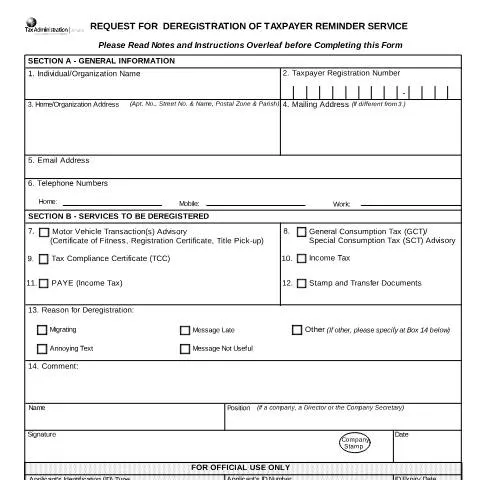
The Request for Deregistration of Taxpayer Reminder Service is a formal application process managed by the Inland Revenue Department (IRD) of Jamaica. This process allows individual taxpayers or organizations to cancel their registration for tax-related reminder services provided via the Jamaica Tax Portal. Understanding the purpose, required documentation, and procedures involved is essential for a smooth deregistration experience.
Objective of the Form
This form is designed to officially request the removal of a taxpayer's registration from the tax reminder system. It is primarily used when a taxpayer no longer wishes to receive automated notifications for tax obligations, or when they are closing their business or changing their tax registration status. The form ensures that the IRD updates its records accurately and prevents unnecessary reminders from being sent.
Preparing Your Application
Before completing the form, applicants should gather the necessary information and documentation, including:
- Taxpayer Registration Number (TRN): a unique identifier issued by the IRD.
- Identification: valid ID such as a passport, driver’s license, or national ID.
- Contact Details: current email address, telephone numbers, and physical address.
- Reason for deregistration: select from options such as migration, service no longer needed, or other specified reasons.
- Authorization: for companies, the form must be signed by a director or company secretary and stamped accordingly.
Filling Out the Form
The form is structured into two main sections:
Section A - General Information
- Enter your full name or organization name.
- Provide your TRN and contact details, including email and telephone numbers.
- Specify your physical and mailing addresses, if different.
- Select the reason for deregistration from the dropdown menu, such as migration or service cancellation.
- If applicable, include comments or additional information in the remarks section.
Section B - Services to be Deregistered
- Indicate the specific tax services or registration types to be deregistered, such as Income Tax, GCT, or PAYE.
- If other services are involved, specify them accordingly.
- For multiple services, select all relevant options to ensure comprehensive deregistration.
Submission Procedures
Once the form is completed, applicants must submit it through the appropriate channels:
- Access the Jamaica Tax Portal at www.jamaicatax-online.gov.jm.
- Log in using your username and password.
- Navigate to the Tax Reminders section and select the deregistration option.
- Review your entered details for accuracy.
- Save and submit your application.
Alternatively, physical applications can be obtained from the nearest Collectorate and submitted in person, along with any supporting documentation, such as company authorization letters or official stamps.
Processing and Confirmation
After submission, the IRD will process your request. The processing officer will verify your details and, if everything is in order, will update the system to reflect your deregistration. You may be contacted for additional information if necessary.
Once approved, you will receive confirmation that your taxpayer reminder registration has been canceled. This prevents further automated notifications related to tax obligations associated with your registration.
Important Notes
- Ensure all information provided is accurate and complete to avoid delays.
- For companies, the application must bear the official stamp and signature of an authorized officer.
- If you wish to cancel a deregistration request, you can select the Cancel option before final submission.
- Keep copies of your submitted form and confirmation for your records.
For further assistance or inquiries, contact the Inland Revenue Department through their official channels or visit your local Collectorate.