Understanding the BDM101 Form: Adding Parent Details to a Child’s Birth Registration in Western Australia
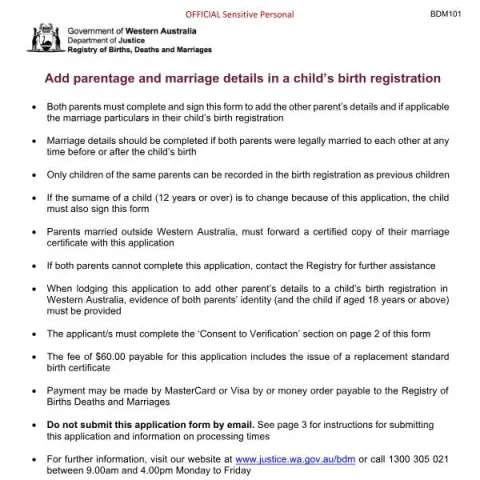
The BDM101 form is an official document used in Western Australia to update a child's birth registration by adding details of a parent or parents after the original registration. This process is essential for parents who were not listed at the time of the child's birth or who wish to correct or include additional parentage or marriage information. This article explains who needs to complete the form, how to do so correctly, and what supporting documents are required.
What Is the Purpose of the BDM101 Form?
The primary purpose of the BDM101 form is to formally record the details of a parent or parents in a child's birth registration. This may include adding a biological father or mother who was not registered initially, or updating marriage details if the parents were married at some point before or after the child's birth. Correcting or updating this information ensures the child's birth record accurately reflects their parentage and family circumstances, which can be important for legal, identity, and heritage reasons.
Who Should Fill Out the Form?
This form must be completed and signed by both parents involved in the child's life to add their details to the birth registration. If the parents were married at any time, their marriage details should also be included. It is important to note that only children of the same parents can be recorded as previous children in the registration. If the child is over 12 and the surname is to be changed as part of this process, the child's signature is also required.
In cases where parents were married outside Western Australia, a certified copy of the marriage certificate must be included with the application. If both parents are unable to complete the form together, the Registry of Births, Deaths and Marriages (WA) should be contacted for further assistance.
How to Complete the BDM101 Form
The form requires detailed information about the parents, the child, and any marriage details. Here are key steps to ensure proper completion:
- Parent Details: Provide full names, maiden names (if applicable), dates and places of birth, occupation, and contact details.
- Child Details: Include the child's full name, place of birth, and date of birth as registered at birth.
- Child’s Surname: Specify the surname to be recorded for the child; if over 12, the child must sign the form to consent to the surname change.
- Marriage Details: If applicable, include the date and place of marriage of the parents.
- Previous Children: List any previous children of the same parents, attaching additional sheets if necessary.
Both parents must sign the "Consent to Verification" section, authorising the Registry to verify their identity and details through third-party systems.
Supporting Documents and Payment
Applicants must include certified copies of identification documents, with at least one containing a photograph, for each parent. If the application is submitted in person, original documents may be required for verification. The fee for processing this application is $60.00, which includes a standard birth certificate. Payment can be made via credit card (MasterCard or Visa) or by money order payable to the Registry of Births, Deaths and Marriages.
Submitting the Application
Applications can be sent by mail or lodged in person:
Fill in your form directly online
No printing: type your details into the boxes of the official form, tick, then download the PDF ready to send.
- 1Type into the form boxes
- 2Tick in one click
- 3Save and download the PDF
- By Post: Complete the form, attach certified identification, and mail to the Registry at PO Box 7720, Cloisters Square, Perth WA 6850.
- In Person: Lodge the completed form with original identification and payment at Level 10/141 St Georges Terrace, Perth, during business hours (9:00 am – 4:00 pm, Monday to Friday).
Note that applications by email or fax are not accepted. Processing times typically take up to 10 working days, plus postal delivery time. It is recommended to include a self-addressed registered or express post envelope for faster return of documents.
Additional Information and Assistance
For further details, applicants can visit the official website or contact the Registry of Births, Deaths and Marriages WA at 1300 305 021 during business hours. The Registry also provides guidance on document certification, verification procedures, and privacy policies related to personal records.
It is important to ensure all information provided is accurate, as making false or misleading statements can have legal consequences under the Births, Deaths and Marriages Registration Act 1998.